The new version of miniSIPServer allows users to make calls from browsers that support WebRTC, such as Chrome, Firefox and Edge. The slight inconvenience is that users must deploy their own TLS/SSL certificates to enable miniSIPServer to launch the WebSocket secure service and receive calls from browsers.
We have recently ported this feature to the cloud-based virtual miniSIPServer. More conveniently, users do not need to worry about certificates, as we automatically deploy TLS/SSL certificates for the virtual miniSIPServer. Users can simply initiate calls directly from their browsers. For example, a URL similar to the following can be used in a browser to place a call to your own cloud-based miniSIPServer:
The server parameter specifies the address of the virtual miniSIPServer. Currently, only virtual servers with the suffix s2.minisipserver.com are supported. If your server uses the old suffix s1.minisipserver.com, you must migrate to a new server to enable WebRTC calling.
For the other parameters: clr, pwd and cld, please refer to the previous documentation. The parameters are identical for both the local miniSIPServer and the cloud‑hosted virtual miniSIPServer.
Likewise, the virtual miniSIPServer currently only accepts incoming calls from WebRTC, and does not support initiating calls from the SIP domain to browsers or WebRTC clients.
In the field of SIP communication, there are two types of keep-alive mechanisms: device-level keep-alive and session (dialog) keep-alive.
Device-level keep-alive currently has mature and unified solutions that comply with RFC 3261, namely detection using the OPTIONS method. If the peer device returns a 200 OK response, the device is considered alive. Terminals can also detect device-level keep-alive using REGISTER requests.
Manufacturers have never had a unified solution for session keep-alive. Although RFC 4028 defines reINVITE and UPDATE for session keep-alive detection, these two operations are too complex for such purpose. They can trigger media renegotiation, which impairs call quality.
At present, manufacturers share basically the same idea: since normal reINVITE and UPDATE operations will trigger new media negotiation, can we use them without SDP directly for session keep-alive? reINVITE is an exception: reINVITE without SDP has already been used in the 3PCC procedure, so it can no longer be used for session keep-alive.
Based on our experience in interconnecting with equipment from various manufacturers over the years, we summarize the following operations for session keep-alive:
UPDATE without SDP
INFO without SDP
MESSAGE without SDP
Default behavior of the latest version of miniSIPServer:
If the above three types of SIP messages are received during a session, the server will enter the session keep-alive processing flow. If the session exists, a 200 OK response will be returned.
UPDATE and INFO can only be transmitted within a session by nature, so they inherently meet the requirements of keep-alive. We recommend using INFO first, as it is explicitly defined in RFC3261 and will definitely be supported by all manufacturers’ equipment. In contrast, the UPDATE method is defined in a supplementary specification. Some manufacturers’ equipment may not support UPDATE, let alone UPDATE without SDP.
MESSAGE can be transmitted both within a session and outside a session, and is used to deliver instant messages. We restrict MESSAGE without SDP to be transmitted only within a session and reserve it for the session keep-alive process.
The “hunting group” is a long-established enterprise communication service that was widely used in the circuit-switched telephone era and remains deployed by many businesses even in the VoIP era. However, times have changed, and the service itself must evolve to keep pace with the characteristics and requirements of IP networks. Based on recent customer needs and changes in the network environment, we have implemented several optimizations to the hunting group feature in miniSIPServer.
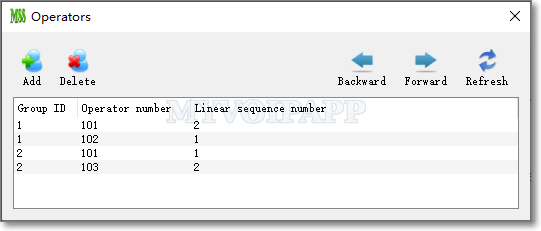
The focus has been on modifying and optimizing the “Operator” feature within the service. Please refer to the image below:
Change 1: One operator can now be assigned to multiple hunting groups simultaneously. Previously, an operator was restricted to a single hunting group, which no longer meets the needs of modern enterprises. As employees often handle multifaceted roles, there is a significant need for them to support multiple hunting groups at the same time. This new feature addresses this requirement.
During the era of circuit-switched telephony, phone terminals lacked sufficient capabilities. Therefore, hunting groups typically allowed operators to log in or out by dialing specific codes. However, for the following reasons, the new hunting group feature in miniSIPServer no longer supports manual operator login or logout:
(1) Most modern SIP terminals now have sufficient functionality to implement features like “Do Not Disturb” directly on the device side, making manual login/logout unnecessary.
(2) Now that one operator can support multiple hunting groups simultaneously, simple login/logout actions are inadequate. Operations would need to be performed for specific hunting groups, making dialing procedures cumbersome and unnecessary.
Change 2: For hunting groups using the “Linear” policy, operators can now be assigned a sequence number to define their selection order. Previously, the selection order was based solely on the sequence in which operators logged into the system, which essentially resulted in a random order and could not meet practical requirements. In real-world scenarios, certain operators often need different priority levels within the group.
An operator with a smaller “Linear sequence number” will be selected earlier by the hunting group. If multiple operators have the same sequence number, they will be sorted by their login time, with those who logged in earlier receiving priority.
Of course, this new configuration does not apply to the “round-robin” strategy. The round-robin strategy always strives to distribute calls as evenly as possible among operators to balance the workload.
The hunting group feature has been updated in both the on-premises and cloud versions of miniSIPServer. There are no differences in configuration or usage between the two versions. Please refer to the product documentation for more detailed information.
Enterprise communication systems are typically deployed within private networks, with Session Border Controllers (SBCs) or voice gateways installed at the network edge to facilitate external communication. Therefore, in most scenarios, enterprise communications remain highly secure. However, a growing number of businesses are now deploying SIP servers in the cloud, while an increasing volume of SIP terminals within enterprises are accessing these corporate SIP servers from external networks. This shift has exposed part (or all) of enterprise communication systems to public networks, making security concerns increasingly severe.
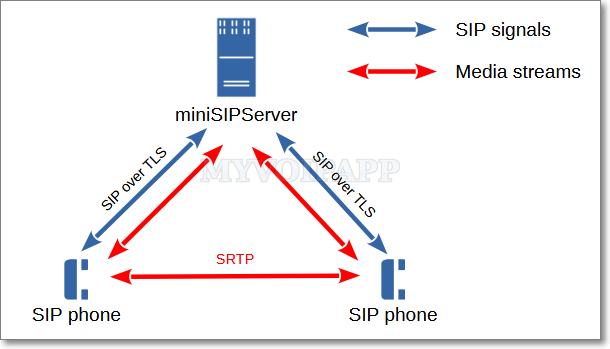
The security of enterprise SIP communication involves many aspects of the network system, such as firewalls. Focusing solely on the SIP communication itself, it must be encrypted to prevent the exposure of communication information to other network users. Encrypted SIP communication consists of two parts: (1) SIP message (signaling) encryption, and (2) voice stream (RTP) encryption, as illustrated in the figure below:
Certainly, enterprises can deploy VPNs to encrypt the entire network system — not just communication systems but also office systems and more. Encrypted SIP communication can also be established over a VPN. However, setting up an enterprise VPN involves relatively high costs and complex systems. This article focuses solely on encrypted SIP communication and does not cover other network security technologies such as VPNs.
SIP message encryption is achieved through “SIP over TLS.” Both cloud-based miniSIPServer, on-premises miniSIPServer, and miniSIPPhone support SIP over TLSv1.2 / TLSv1.3. Please refer to the online documentation for details, as this article will not elaborate further on this topic.
Voice streams are encrypted through SRTP or DTLS-SRTP transmission. The master key and master salt for SRTP are transmitted and negotiated via the SDP (RFC4568) in SIP messages. Therefore, only when SIP messages are encrypted can the critical information of SRTP be ensured not to be leaked. Simply encrypting voice streams with SRTP while transmitting SIP messages in plaintext cannot guarantee the overall security of SIP communication.
RFC4568 defines several cryptographic suites. Currently, we have chosen to support the default AES_CM_128_HMAC_SHA1_80 and do not yet support other encryption suites.
The SRTP protocol family includes numerous extensions. Currently, miniSIPServer and miniSIPPhone support the most fundamental RFC3711 protocol, which is also the basic SRTP protocol supported by the vast majority of SIP devices (including servers, PBXs, SBCs, and endpoints). miniSIPServer can also support RFC5763 which is the basic protocol for DTLS-SRTP. (At present, some SIP clients don’t support DTLS-SRTP, so if you want to deploy that, please check their capabilities carefully.)
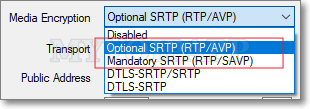
miniSIPServer and miniSIPPhone can enable SRTP by default without requiring additional configuration. Some SIP devices need explicit configuration to select SRTP. For example, when configuring an account in MicroSIP, the “Media Encryption” setting must be configured as follows:
As we known, cloud miniSIPServer users can create IVR-XML files and audio files to build special communication services for their own companies. But these files had to be sent to our support team to upload to their virtual servers for them.
It is very cumbersome and inconvenient.
Now we upgrade cloud system to permit users to upload IVR-XML and audio files by themselves. Please click menu “Profile – IVR-XML file or System audio file” to do that.
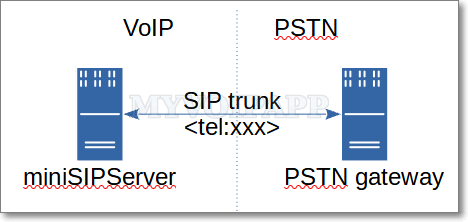
As we known, the VoIP (SIP) domain always uses SIP URI to establish call sessions. To work with traditional PSTN networks, we need gateways (or SBC) to bridge two networks. Most of these gateways can support SIP URI, so we can always use SIP trunk to estanlish connections between VoIP and PSTN with SIP URIs which are as same as connections between VoIP domains.
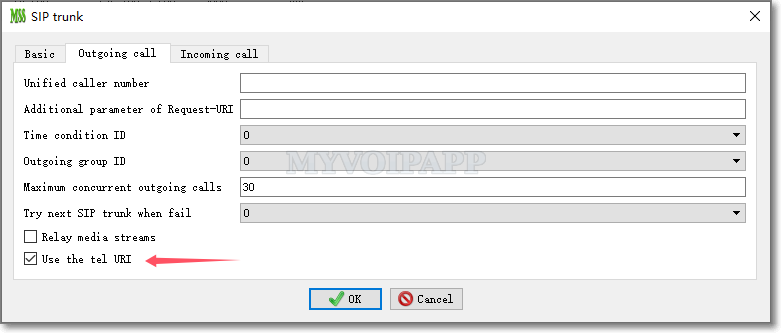
But some gateways cannot support SIP URIs, they can only accept traditional telephone numbers which are the tel URIs defined in RFC3966. The URI is in “<tel: xxx>” format, not in “<sip:name@address>”format. Please refer to the figure below.
miniSIPServer can always accept the tel URI from peer sides, but never send out the tel URI. In recent months, several customers ask us to support sending out the tel URI through SIP trunks to work with some PSTN gateways. So we upgrade miniSIPServer to V60 (build 20250208) to update the SIP trunk functions. In the “outgoing call” of SIP trunk, we can select “Use the tel URI” item, then miniSIPServer will use <tel> URI to make outgoing calls for the SIP trunk.
For incoming calls of the SIP trunk, it is unnecessary to configure anything since miniSIPServer can accept both SIP URI and TEL URI.
miniSIPServer is upgraded to V60 which is the latest stable version for business development. The first big thing is “conference room” feature which provides conference calls for local users. At most 5 clients can join the same conference call. Please refer to the service document for more details. Cloud miniSIPServer is also upgraded to support this feature.
In another way, as we have posted in previous blog, several services are finally removed from local miniSIPServer, such as calling-card and call-shop. These features were important for some of our customers, but it is time to say good-bye now.
miniSIPServer recently is upgraded to support TLSv1.3. This modification doesn’t affect configuration, so you need to do nothing if you upgrade your miniSIPServer to the latest versions.
Two modules could use TLS transport: (1) SIP server, and (2) Embeded HTTP server. If your SIP phones can support TLSv1.3, it is better to use TLSv1.3 to protect communication. Please refer to “SIP over TLS” document for more details. Both local miniSIPServer and cloud miniSIPServer can support SIP over TLSv1.3 now.
By default, miniSIPServer starts an embeded HTTP server for web management. If you want to manage it through the pubilc network, you have to enable TLS transport to protect HTTP information. In another way, most navigators, such as Chrome, Edge, Firefox and so on, can support TLSv1.3 now. Please refer to “web management” document to enable encrypted HTTP.
“Call forwarding” is a very traditional service in VoIP or communication fields. By default, SIP clients can send 3xx messages to miniSIPServer to invoke a forwarding. In another way, miniSIPServer can also directly invoke forwarding by itself.
But when the callee side is being forwarding, the caller side knows nothing about it. In most scenarios, the caller parties don’t care the forwarding. but some customers sometimes need to know what happens when the call is being forwarded.
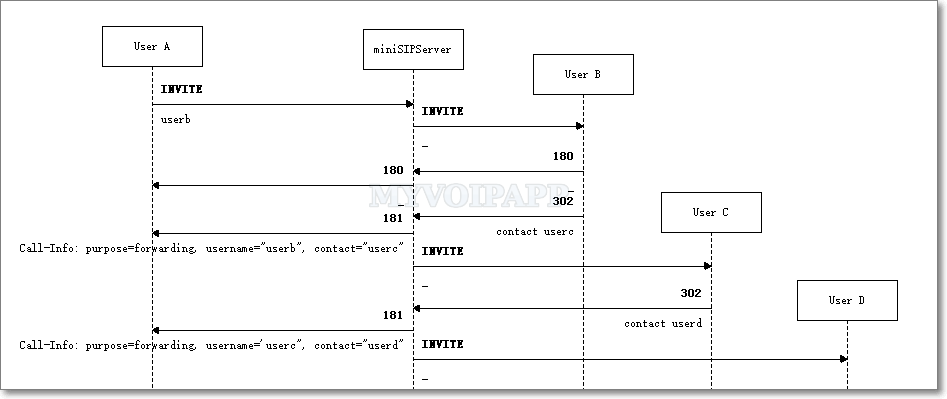
miniSIPServer can send 181 “Call Is Being Forwarded” messages back to the caller side to update it that callee side is being forwarding. In the 181 messages, miniSIPServer will add a Call-Info header to indicate the forwarding information. Please refer to the figure below.
In this figure, there are two forwardings, (1) user B is being forwarded to user C; and (2) user C is being forwarded to user D.
The Call-Info header of the 181 message will indicate (1) the call is being forwarded, (2) who is being forwarded, and (3) who is being forwarded to. Please refer to the Call-Info header of the first 181 message which indicates user B is being forwarded to user C.
When miniSIPServer sends out SIP messages, such as REGISTER or INVITE messages, to VoIP providers, it will add a parameter ‘user=phone’ after Request-URI. It is required by China Mobile network. In most scenarios, it is no problem since URI parameters are defined in RFC3261.
But unfortunately, some customers recently reported us that their miniSIPServers failed to connect to their VoIP providers because these providers’ servers cannot recognize parameters of Request-URI. Of course, the easy way is that the VoIP providers upgrade their servers to fit RFC3261, then everybody will be comfortable.
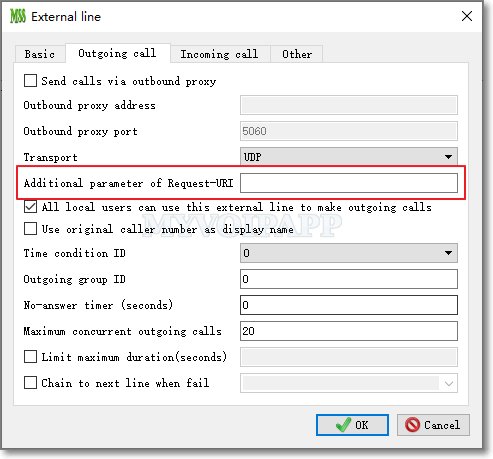
Some of them insist on their status and refuse to make any change. Then we have to make a change in external lines’ configuration. Please refer to the figure below.
We add a new item “additional parameter of Request URI” in external lines’ outgoing call configuration. Then customers can control the parameter according to their real network environments.
In another way, if the GUI is in Chinese which means the customer might configure miniSIPServer for China networks, the default value of such item will be “user=phone”. Otherwise, its default value is blank. We think it will flexibly fit the network requirements around the world.