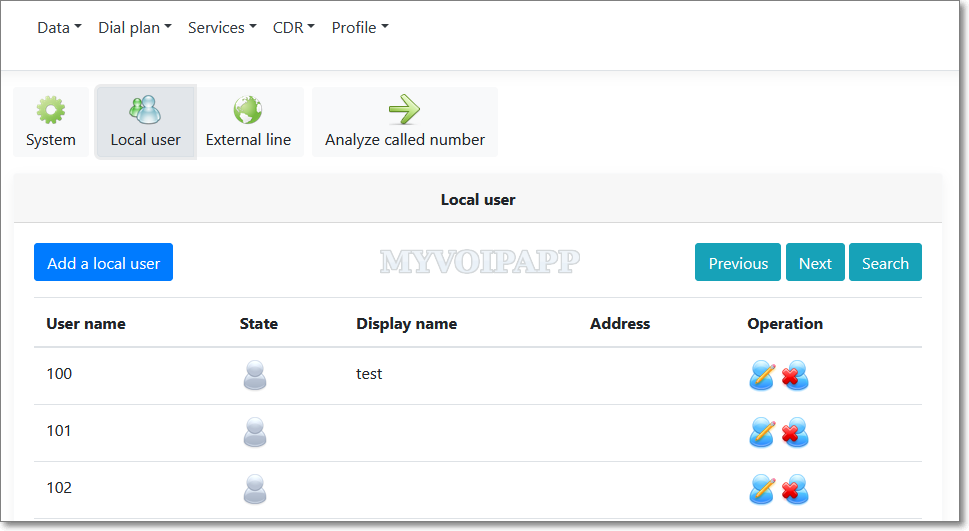
We upgrade web UI for miniSIPServer, including cloud miniSIPServer and local miniSIPServer. The new web UI is quite like GUI of local miniSIPServer. Please refer to the figure below.
We hope users who are familiar with local miniSIPServers can enjoy it and experience the cloud miniSIPServer system quickly.
By default SIP network always uses SIP URI to carry information, such as From, To, and so on. For example:
sip:+8613901088888@ims.bj.chinamobile.com
But for traditional telecommunication networks, they always use E.164 telephone numbers which are different with SIP URI. So ETSI (or 3GPP) defines a new URI, that is TEL URL. For example:
tel:+8613901088888
So when working with IMS networks, there could have two URI formats, SIP URI and TEL URI. miniSIPServer can support both formats, it can process TEL URI of incoming calls automatically, but all outgoing calls always use SIP URI formats.
It could be a problem. Fortunately IMS networks consider it very carefully. For example, China Mobile can accept TEL URI and SIP URI with special parameter ‘user=phone‘ which is described below.
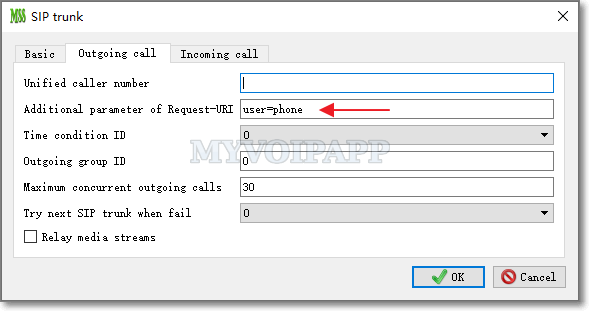
If we configure external lines of miniSIPServer to work with China Mobile networks, it can be no problem because miniSIPServer will automatically add ‘user=phone’ to Request-URI. But in some markets, China Mobile requires to establish SIP trunk connections, then it could be a problem. miniSIPServer will not add ‘user=phone’ in Request-URI since we think it is a ‘server to server’ scenario.
To fix that, we add a ‘additional parameter of Request-URI’ parameter in SIP trunk outgoing call configuration. Please refer to the figure below.
As we know, RFC3262 defines SIP reliability of provisional responses. It is an old feature and miniSIPServer ( both local versions and cloud versions) can support it for a long time. When working with traditional telcom carriers, this feature is mandatory, that means carriers will reject all incoming calls if they cannot support reliability of provisional responses.
RFC3262 defines a “100rel” parameter to indicate reliability of provisional responses, so we call it “100rel” capability. In normal, when invoking a call, the caller should make itself clearly that it can support “100rel” capability, and of course, the callee side should also make itself clearly that it requires to use “100rel” capability.
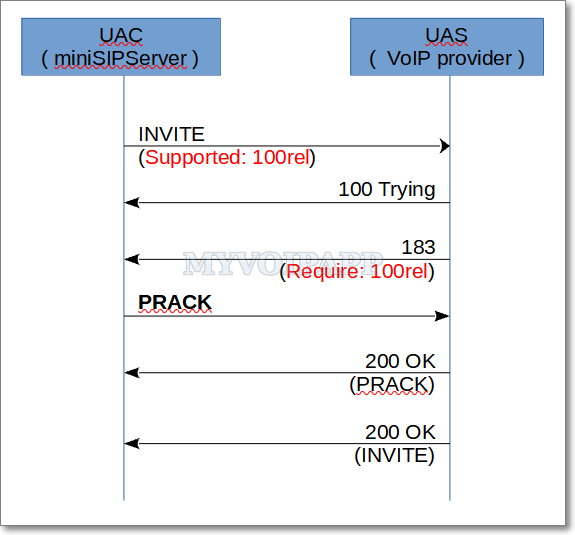
Basic call flow with 100rel
In the RFC3262, we can get following details:
…… the initial request contained a Supported or Require header field listing 100rel, and that there is a provisional response to be sent reliably. ……
UAS core … MUST contain a Require header field containing the option tag 100rel, and MUST include an RSeq header field.
Then both sides can establish reliability of provisional responses. Above figure describes the basic call flow. When UAC receives a 18x message which is a provisional response, UAC should send a PRACK message back to tell UAS that UAC has received its 18x message.
This is not a complex call procedure. We thought it wasn’t until several days ago. One of our cloud miniSIPServer customers reported he cannot make calls out. Then we traced his calls and get following call flow described below.
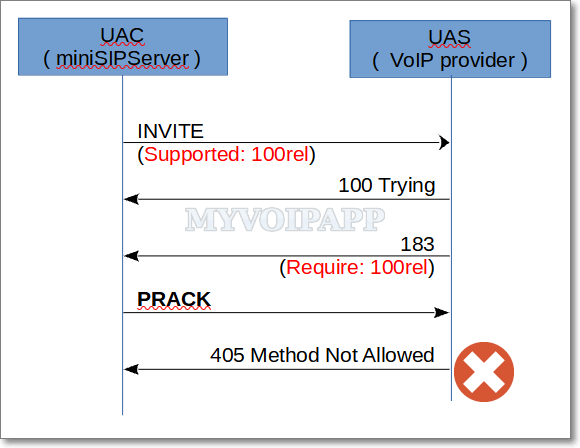
405 error in a 100rel procedure
Unbelievable …… this voip provider requires “100rel” in its 183 messages, but once miniSIPServer sends PRACK messages to confirm that, it returns “405 method not allowed” to reject them, and it causes every call failed.
Why?! If it cannot accept or support PRACK messages, why does it require “100rel” in its provisional responses?
It is quite easy to fix that. Just remove its “require 100rel” from 18x messages, miniSIPServer will not send PRACK messages back. But unfortunately, the team of this voip provider doesn’t know how to do that.
Our customer is blocked and his service has to be stopped. In another way, I personally think some VoIP providers use public open source servers, such as Asterisk, FreeSwitch, and so on, to build their solutions, maybe they don’t have enough experts to understand what they built.
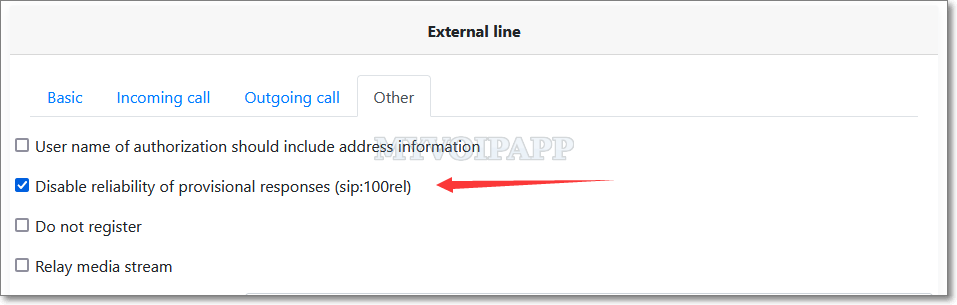
So we update miniSIPServer to add an option in external lines configuration to disable reliability of provisional responses. Please refer to the figure below.
disable reliability of provisional responses
If you check this item, the INVITE messages sent from miniSIPServer will not have “support 100rel” parameter. Once you meet such a ridiculous VoIP provider, you can try this.
Recently lots of customers reported that they didn’t receive activation emails when they signed up miniSIPServer cloud accounts. All of them are using free email systems, such as gmail, and so on.
At first we think such systems move our emails to spam boxes, but customers still cannot find them there, so we think our emails are blocked.
We completely understand that. Since lots of email are sent from our cloud system to free email systems, including activation emails, balance notification emails, and so on, some email systems detect us to be a spammer.
It confuses us and we don’t want that, so we decide that our cloud system cannot accept customers use free email addresses to sign up miniSIPServer cloud accounts. We hope our cloud system to be treated as a serious virtual VoIP system, and we hope our custmers can understand that.
In most scenarios, the size of IVR-XML files are very small, only several KB, so it is no problem to read these files from hard disk when processing an incoming call to trigger IVR service. But if there are heavy workloads, for example, huge concurrent calls to trigger IVR services, miniSIPServer has to read these files from hard disk frequently. Obviously, it will affect server’s performance.
So we try to optimize this and load all IVR-XML files into memory. If the file is not modified, IVR service will read it from memory directly. If the file is modified, miniSIPServer will reload it into memory automatically.
That means all IVR operations will be processed in memory and will never visit hard disk if the files are not modified. With this optimization, miniSIPServer will be faster than before.
With previous versions, if you want to configure miniSIPServer to relay media streams, miniSIPServer will only relay audio streams and discard video streams.
It is because video streams require much more bandwidth and calculation capability. Some devices cannot support that. But more and more customers require us to refine it to relay video streams at the same time since most devices are more powerful and they have enough bandwidth.
It seems reasonable and we think we need upgrade miniSIPServer to fit such requirements.
So the latest versions (build 20210604) are released. If miniSIPServer is trying to relay media streams, it will relay audio streams and video streams together.
You don’t need change your configuration. And please pay attention to your device capability and bandwidth.
Our data center updates us that maintenance is required for one or more of our servers’ physical hosts. The hosts will be rebooted, and a number of critical updates will be installed.
The maintenance schedule in UTC is as follows:
2020-08-07 03:00:00 AM UTC
Important to know: (1) A 2-hour window is allocated, however, the actual downtime should be around 45 – 60 minutes. (2) Your virtual server(s) will be cleanly shut down and will remain inaccessible during the maintenance window. (3) You might reboot your SIP phones/devices to register to virtual server(s) again once the virtual server(s) is(are) back to work.
Please let us know if you have any questions or concerns. Thanks!
In normal, cloud miniSIPServer almost has the same services with local miniSIPServer. But for some limitations, there are some different features between them. For example, voice mail service is different.
With local miniSIPServer, each local user or extension can prompt their own audio in voice mail procedure. But with cloud miniSIPServer, each local user can only prompt the unified audio associated with their virtual PBX server. Of course, the default unified audio can be replaced with customer’s own audio file.
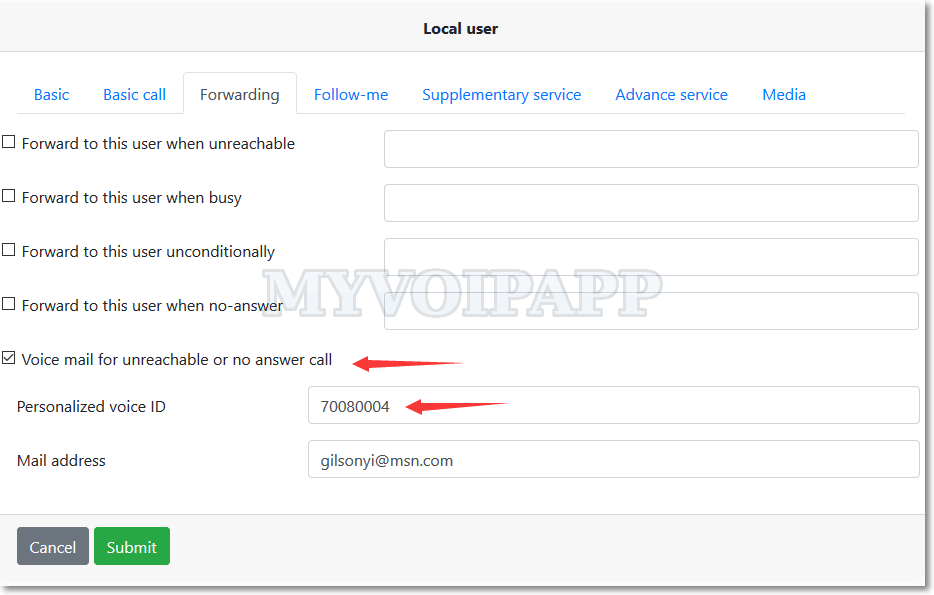
Now cloud miniSIPServer is upgraded. In a virtual server, each local user can has its own audio file now. Please refer to following figure. You can see a new item “Personalized voice ID” which can be different for different user.
Personalized audio configuration
Of course, the audio file cannot be uploaded to virtual server by customers themselves. If you want to upload audio files, please send them to our support team, we will upload them to your virtual server manually.
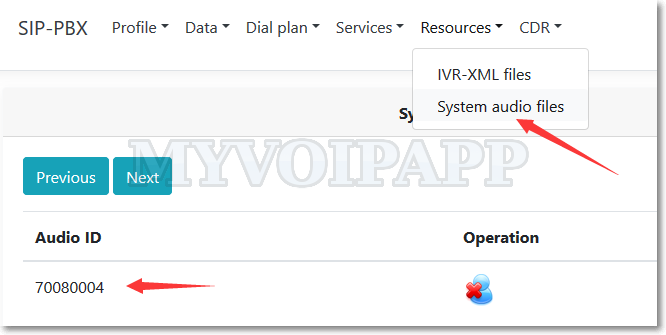
Once the audio files are uploaded, you can manage them by yourself. Please refer to following figure.
Audio files management
In another way, you need follow some rules to create your own audio files, such as the file format and the audio codec, and so on. Please refer to online document for more details.
In the end of next month (2020-01-31), we will clear some zombie virtual servers from our cloud system.
If the virtual server has following features, we will define it to be a zombie node and will be cleared in this action.
(1) The virtual server has not be signed in or activated since 2 years ago. If you didn’t sign into your account or virtual server after 2017-01-01, please sign into your account at less one time to avoid that.
(2) And there isn’t any SIP clients register to the virtual server, or there isn’t any SIP calls after 2017-01-01.
Zombie virtual servers waste our resources and are not affair to other customers, so please pay attention to this action and thanks for understanding.
2020-02-13 updated: This task is finished now. In future, we will keep clearing zombie virtual servers without notification. If your virtual server is not signed in or activated in recent 1 year, please pay attention to this.
In miniSIPServer, we can use IVR-XML script to enable our own services, such as automatic-attendant. With previous IVR-XML set, ‘callto’ action will invoke a call to destination and finish the whole IVR process.
But if we want to monitor some events in the call flow, such as we want to check ‘busy’ event and change the IVR flow to a new action, what should we do?
Now V37 is released and a key feature is updated in IVR-XML. We can use ‘monitor-events’ in ‘callto’ action to monitor some events and change the call flow if they are caused.
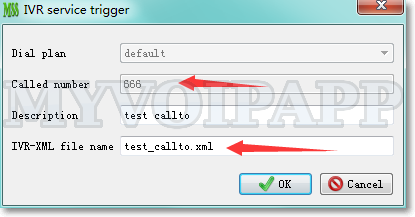
For example, the ‘callto’ action can be configured as below.
Above zip file is an example of new ‘callto’ action. You can save and unzip it into ‘xml’ sub-directory where miniSIPServer is installed and configure a new record to test it.