The new version of miniSIPServer allows users to make calls from browsers that support WebRTC, such as Chrome, Firefox and Edge. The slight inconvenience is that users must deploy their own TLS/SSL certificates to enable miniSIPServer to launch the WebSocket secure service and receive calls from browsers.
We have recently ported this feature to the cloud-based virtual miniSIPServer. More conveniently, users do not need to worry about certificates, as we automatically deploy TLS/SSL certificates for the virtual miniSIPServer. Users can simply initiate calls directly from their browsers. For example, a URL similar to the following can be used in a browser to place a call to your own cloud-based miniSIPServer:
The server parameter specifies the address of the virtual miniSIPServer. Currently, only virtual servers with the suffix s2.minisipserver.com are supported. If your server uses the old suffix s1.minisipserver.com, you must migrate to a new server to enable WebRTC calling.
For the other parameters: clr, pwd and cld, please refer to the previous documentation. The parameters are identical for both the local miniSIPServer and the cloud‑hosted virtual miniSIPServer.
Likewise, the virtual miniSIPServer currently only accepts incoming calls from WebRTC, and does not support initiating calls from the SIP domain to browsers or WebRTC clients.
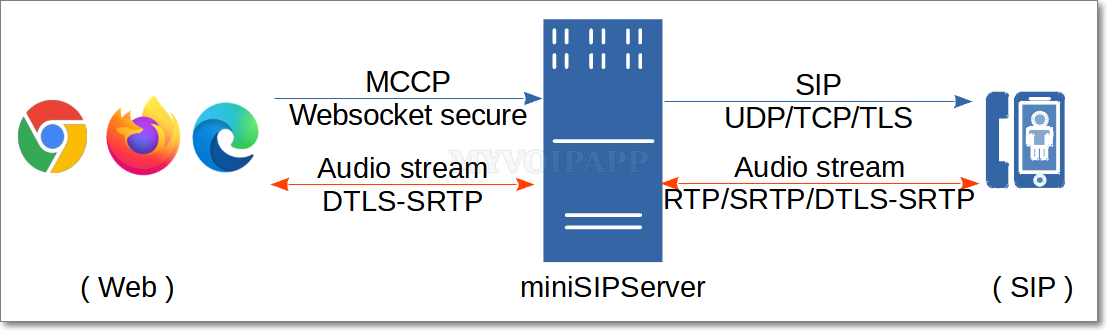
The newly released miniSIPServer (V70 build 20250402) supports an interesting feature: you can use a WebRTC-compatible browser (such as Chrome, Firefox, etc.) to make calls through miniSIPServer to devices within the SIP domain, including IP phones, gateways and other endpoints. The network topology is shown in the figure below:
The audio stream is transmitted via DTLS-SRTP with end-to-end encryption and interconnected with miniSIPServer. Currently, only voice calls are supported; video calls are not available.
The web side adopts a simplified signaling protocol (MCCP, miniSIPServer Call Control Protocol) for call control, and interconnects with miniSIPServer via encrypted WebSocket connections (WSS, WebSocket Secure). Currently, only calls initiated from the Web domain to the SIP domain are supported; reverse calls from the SIP domain to the Web domain are not available.
Simply enter the following URL in the browser to initiate a call to the SIP domain (for example, extension 100 calling extension 101):
The URL adopts a command-line-like format, with each parameter explained as follows:
https://www.myvoipapp.com/miniwebphone2/lite.html is a simple webpage. After being loaded in a browser, it can establish a WSS connection with the specified miniSIPServer server and initiate calls. You may download this webpage along with its related resources to your local device or a local web server; calls can also be initiated normally by opening the local file in a browser.
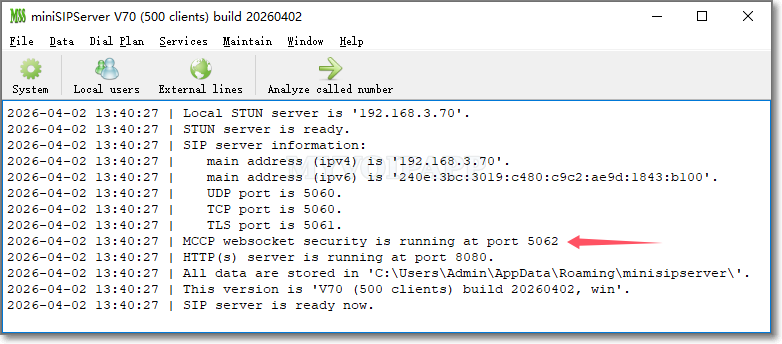
serverspecifies the address of the miniSIPServer. The miniSIPServer must have successfully loaded the certificate and private key, and enabled the WSS service. By default, miniSIPServer always runs the WSS service on TCP port 5062.
clrspecifies the caller number for initiating a call. This number must be a valid extension number assigned on miniSIPServer.
pwdstands for the authentication password of the caller, which is the password configured for the corresponding extension in miniSIPServer. miniSIPServer authenticates calls by verifying the combination of caller number and password. Only authenticated calls are allowed to connect; otherwise, the call will be rejected directly by miniSIPServer.
cldindicates the called number, which can be a local extension number or an outbound dialing number.
The audio stream is transmitted over DTLS-SRTP with end-to-end negotiation and encryption, requiring no additional configuration on miniSIPServer.
To enable the WSS service and accept MCCP call messages from browsers, miniSIPServer only requires configuration of certificate and private key.
miniSIPServer has the following requirements: (1) Certificates and private keys must be stored in the wrtcCert subdirectory under the application data directory; (2) Files must be in PEM format; (3) The certificate must be named server.crt and the private key must be named server.key. For example, on Linux systems, these two files should be located as follows:
miniSIPServer V25 is updated to fix some bugs and refine system to be more stable. The most important change is that we cut ‘webRTC’ feature from this version and abover.
As we described in previous post, MSS webRTC feature can work with Chrome navigator. Chrome is upgraded to V48 and make some changes to webRTC and doesn’t consider compatibility with previous version. We think maybe webRTC is perfect for public network services, such as Google hangouts, but it is not suitable or flexible for small or middle size enterprise communication markets.
So we cut it from V25, and keep it in V24. If you are using webRTC feature, please keep your Chrome to V47 or lower versions.
Today we upgrade cloud-MSS to support webRTC. That means you can use miniWebPhone to connect to your virtual MSS node now, you don’t need to install any SIP softphone or hardphone to work with cloud-MSS if you have installed Chrome in your PC.
Please refer to following document for more details about webRTC and MSS:
webRTC is defined in HTML5 to support real-time communication. We spent several months in this technology and release the latest V18 to support it finally!
Now you can connect Chrome to miniSIPServer to work as local user. It is so interesting and hope it can help you to deploy your own VoIP network.
Please refer to following document for more details about webRTC in MSS: