Browsed by
Category: Releases

Product release messages, including LTS, stable, development versions and patches.

miniSIPServer V14

miniSIPServer V14

miniSIPServer is upgraded to V14.2 now. With latest versions, following key features are included:

(1) For raspberry Pi. As we know, raspberry Pi is a very small PC run on Debian system, MSS can work on this hardware now. It is very helpful for some small business who dont want to maintain a PC hardware and save many cost.

(2) Provide open API. MSS can start web server and provide open HTTP API . 3rd parties can use this interface to intergrate with their own system. At this time, open API set can support: query MSS version; configure or query details of local users.

(3) Routing group. It is a very helpful feature for customers who have lots of external lines or SIP trunks. They can manage these lines or trunks into different groups for different users or for different calls. The workload of group is in round-robin policy.

Hope you can enjoy our new versions! If you have any questions or suggestions, please feel free to contact us. We are always here for you.

Call waiting service

Call waiting service

Most SIP devices, such SIP phones, can support “call waiting” service themselves. But for some old SIP devices, such as some simple SIP ATA devices, it is required PBX to provide “call waiting” service.

So we upgrade MSS to V13.6 to provide this service. In MSS, we name it as “simple call waiting” service because MSS’ call waiting service only support

(1) put original call into waiting queue if current called party is busy.

(2) reconnect previous calls if current called party is available.

So user cannot press ‘R’ key to switch calls. It is simple and we hope it can fit most customers requirements.

Please refer to our service document for more details:

http://www.myvoipapp.com/docs/mss_services/call-waiting/index.html

miniSIPServer for Debian 7

miniSIPServer for Debian 7

We update and rebuild miniSIPServer V13.2 to fit Debian 7 system, now it is no problem to run MSS on Debian 7 and Ubuntu 12.04 systems with same DEB packages.

If you are Debian 6 users, it is time to upgrade to Debian 7 now and hope you can enjoy our products.

miniSIPServer LTS upgraded to V12

miniSIPServer LTS upgraded to V12

The latest LTS is upgraded from V6.6 to V12 which has been tested and deployed around world by our customers.

V12 has much more features than previous V6.6.x and stable enough to be a new LTS version. Of course, we provide at least one-year supporting service for this new version.

Previous LTS version (V6.6.x) will be kept in supporting list until end of this year (2013).

At the same time, stable version is upgraded to V13. New features will be merged into this version and V12 will not include any new feature or service.

Define your own IVR service in cloud

Define your own IVR service in cloud

As we know, we can define and use our own IVR-XML file to trigger IVR service in local miniSIPServer. Now we migrate this feature into cloud-mss, that means we can do that in cloud communication in the same way.

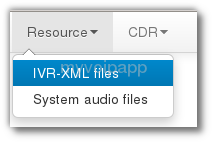
In local-MSS, we can save IVR-XML file into local directory. In cloud-mss, something is different. For safety protection, we require customers to send IVR-XML files to our support team (support(a)myvoipapp.com), our guys will upload your own IVR-XML file to your virtual server. Then, once you sign into cloud-mss, please click menu ‘Resource / IVR-XML files’ to take a look.

check IVR-XML files in cloud-mss
Cloud-MSS menu ‘IVR-XML files’

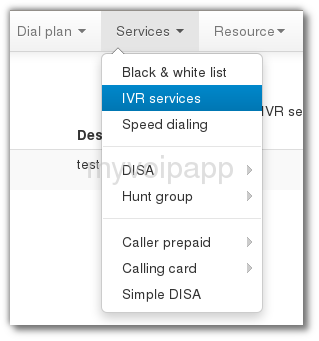
If your own IVR-XML file has been uploaded into your virtual server, you can configure how to trigger IVR service. In MSS, we can trigger IVR services according to called numbers of calls. It is very easy to configure that, please click menu ‘Services / IVR services’ to take a look.

configure detection of IVR-XML service
IVR-XML service trigger
New versions, same experience!

New versions, same experience!

We are pleasure to announce that local-MSS V11.2 is released and cloud-MSS is upgraded at the same time.

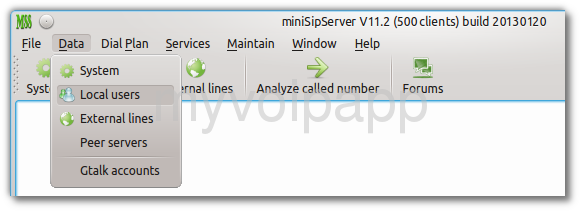
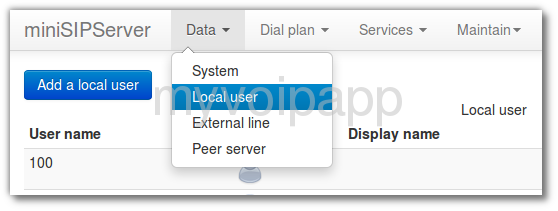
The most important is that all these versions have almost same user experience! As we know, local-MSS has quite different UI with its own web UI and cloud-MSS. Some customers are often  confused when they migrate local-MSS to cloud-MSS since they have quite different UI. From now, they have almost same UI and same operations.  Please take a look at following figures:

GUI of local MSS
GUI of local MSS
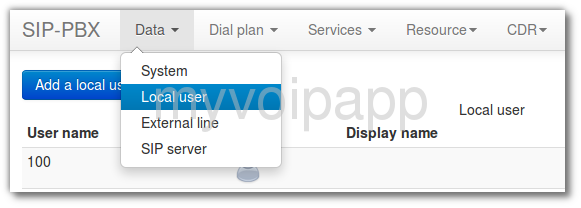
web UI of local MSS
web UI of local-MSS
main UI of cloud-MSS

They are almost same, right? Of course, some details are different. We have tried to make them as same as possible to provide unified user experience. Hope you can enjoy it. Take a try please! It is interesting.


miniSipPhone is coming!

miniSipPhone is coming!

At the begining of this year, we upgrade our miniSipPhone to V2 and release it today!

We add some features into MSP V2. For example, some customers are always confused with one-way audio problem. In MSP V2, we configure default STUN process and it can detect NAT automatically. Customers don’t need to configure STUN again.

The new version is as simple as enough, we believe you will find it is so easy to use and hope you can enjoy it!

If you are interesting in it, please visit our website and download it to take a try:

http://www.myvoipapp.com/download/


Gtalk to SIP

Gtalk to SIP

We are very exciting to release miniSipServer new version 11! This is a great version and can support ‘Gtalk to SIP’ feature now.

What that means? It means you can connect your VoIP network with Gtalk network now. Gtalk users can call to your extensions directly, use your VoIP services, and so on. We bring Gtalk into your enterprise communication system. Funny!

Please refer to our online document for more details:

http://www.myvoipapp.com/docs/mss_services/gtalk/index.html

SIP over TCP

SIP over TCP

As we know, most SIP devices use SIP over UDP by default,  however, some SIP servers or communication servers only support SIP over TCP. We have to say that’s really strange. Our customers need work with such devices and we upgrade MSS to V10.5 to support SIP over TCP to fit this requirement.

It is very easy to configure MSS to support this feature. If you are interesting in it, please refer to following document for more details about it:

http://www.myvoipapp.com/docs/mss_services/sip-over-tcp/index.html