Browsed by
Category: miniSipServer ( local )

SIP server for windows and Ubuntu system

How to run miniSIPServer on Ubuntu?

How to run miniSIPServer on Ubuntu?

Updated: Now you can visit online document for more details.


If you are using Ubuntu (desktop), it is very easy to run MSS. Just download .deb file from our website and double click such .deb file to install it. Then you can find MSS icon in ‘internet’ or ‘network’ menu group and run it to start MSS.

If you are using Ubuntu (server), something is different. You need do more steps to install and run MSS. We describe details below.

First, you must download .deb file from our website, for example ‘mss_v13_u20.deb’. Then, you can run following command:

sudo dpkg -i mss_v13_u20.deb

At this step, Ubuntu will prompt error that some dependencies must be installed. Don’t warry, please continue following command:

sudo apt-get -f install

Then Ubuntu will try to get and install all necessary dependencies from Ubuntu software center.

In Ubuntu server, you cannot run MSS GUI since X windows is not started. You can run MSS CLI version whose file name is ‘msscli’ and can be found in directory ‘/opt/sipserver’.

So it is very easy to start MSS now:

/opt/sipserver/msscli

To visit and manage MSS system, you need visit its web system whose TCP port is 8080 by default. Please refer to following document:

http://www.myvoipapp.com/docs/mss_services/web_management/index.html
miniSIPServer for Debian 7

miniSIPServer for Debian 7

We update and rebuild miniSIPServer V13.2 to fit Debian 7 system, now it is no problem to run MSS on Debian 7 and Ubuntu 12.04 systems with same DEB packages.

If you are Debian 6 users, it is time to upgrade to Debian 7 now and hope you can enjoy our products.

Kubuntu/Ubuntu 13.04 released

Kubuntu/Ubuntu 13.04 released

Yesterday, new Kubuntu and Ubuntu 13.04 were released. We download all these versions and try to run miniSIPServer V13.2.

Everything is perfect, it is no problem to run MSS on the latest Kubuntu and Ubuntu 13.04.

Since MSS is built with Qt library, we suggest it is better to deploy Kubuntu. In our lab, Ubuntu is so slow and Kubuntu is much better.

miniSIPServer LTS upgraded to V12

miniSIPServer LTS upgraded to V12

The latest LTS is upgraded from V6.6 to V12 which has been tested and deployed around world by our customers.

V12 has much more features than previous V6.6.x and stable enough to be a new LTS version. Of course, we provide at least one-year supporting service for this new version.

Previous LTS version (V6.6.x) will be kept in supporting list until end of this year (2013).

At the same time, stable version is upgraded to V13. New features will be merged into this version and V12 will not include any new feature or service.

New versions, same experience!

New versions, same experience!

We are pleasure to announce that local-MSS V11.2 is released and cloud-MSS is upgraded at the same time.

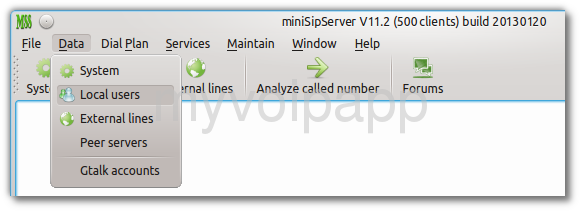
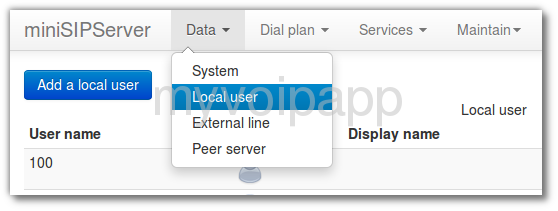
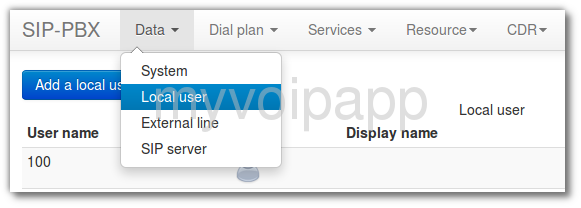
The most important is that all these versions have almost same user experience! As we know, local-MSS has quite different UI with its own web UI and cloud-MSS. Some customers are often  confused when they migrate local-MSS to cloud-MSS since they have quite different UI. From now, they have almost same UI and same operations.  Please take a look at following figures:

GUI of local MSS
GUI of local MSS

web UI of local MSS
web UI of local-MSS

main UI of cloud-MSS

They are almost same, right? Of course, some details are different. We have tried to make them as same as possible to provide unified user experience. Hope you can enjoy it. Take a try please! It is interesting.


Gtalk to SIP

Gtalk to SIP

We are very exciting to release miniSipServer new version 11! This is a great version and can support ‘Gtalk to SIP’ feature now.

What that means? It means you can connect your VoIP network with Gtalk network now. Gtalk users can call to your extensions directly, use your VoIP services, and so on. We bring Gtalk into your enterprise communication system. Funny!

Please refer to our online document for more details:

http://www.myvoipapp.com/docs/mss_services/gtalk/index.html

miniSipServer for ubuntu 12.10

miniSipServer for ubuntu 12.10

Yesterday we got and installed latest Xubuntu/Kubuntu/Ubuntu 12.10, then we installed latest miniSipServer V10.5 on these platforms.

The result is perfect! It is no problem to run MSS without any modification.

In another way, we would like to suggest Xubuntu and Kubuntu. According to our test result, Ubuntu system is very slow, however Xubuntu and Kubuntu are perfect.

SIP over TCP

SIP over TCP

As we know, most SIP devices use SIP over UDP by default,  however, some SIP servers or communication servers only support SIP over TCP. We have to say that’s really strange. Our customers need work with such devices and we upgrade MSS to V10.5 to support SIP over TCP to fit this requirement.

It is very easy to configure MSS to support this feature. If you are interesting in it, please refer to following document for more details about it:

http://www.myvoipapp.com/docs/mss_services/sip-over-tcp/index.html

Trigger customerized Python service

Trigger customerized Python service

As you may know, we can implement service logic by using Python script. It is very flexible to fit all kinds of customers’ requirements.

For example, MSS’ calling card service is written in Python script. In some fields, some customers require some different service logic,such as playing audio or not, prompt this or that, and so on. We can update python script file according to their requirement without any modification to MSS core.

But something is not so flexible. For example, the trigger of calling card is fixed in MSS core with previous versions. That means you can only trigger calling card service with called number ‘*300*’ of incoming calls. Some customers don’t like this number, some others want to support more called number to trigger calling card service.

With V10.4 released, we can configure different trigger for python services. In fact, we can trigger a python service according to their dial-plan and destination number in incoming calls. So everything is perfect now! Customers can implement their own service logic, they can trigger their services according to their real requirement. You don’t like ‘*300*’? no problem, just need configure another record!

For more details, please refer to manual document:

http://www.myvoipapp.com/docs/mss_services/manual/index.html#python_services