Browsed by
Author: Gilson

How to run miniSIPServer on Ubuntu?

How to run miniSIPServer on Ubuntu?

Updated: Now you can visit online document for more details.


If you are using Ubuntu (desktop), it is very easy to run MSS. Just download .deb file from our website and double click such .deb file to install it. Then you can find MSS icon in ‘internet’ or ‘network’ menu group and run it to start MSS.

If you are using Ubuntu (server), something is different. You need do more steps to install and run MSS. We describe details below.

First, you must download .deb file from our website, for example ‘mss_v13_u20.deb’. Then, you can run following command:

sudo dpkg -i mss_v13_u20.deb

At this step, Ubuntu will prompt error that some dependencies must be installed. Don’t warry, please continue following command:

sudo apt-get -f install

Then Ubuntu will try to get and install all necessary dependencies from Ubuntu software center.

In Ubuntu server, you cannot run MSS GUI since X windows is not started. You can run MSS CLI version whose file name is ‘msscli’ and can be found in directory ‘/opt/sipserver’.

So it is very easy to start MSS now:

/opt/sipserver/msscli

To visit and manage MSS system, you need visit its web system whose TCP port is 8080 by default. Please refer to following document:
http://www.myvoipapp.com/docs/mss_services/web_management/index.html
miniSIPServer for Debian 7

miniSIPServer for Debian 7

We update and rebuild miniSIPServer V13.2 to fit Debian 7 system, now it is no problem to run MSS on Debian 7 and Ubuntu 12.04 systems with same DEB packages.

If you are Debian 6 users, it is time to upgrade to Debian 7 now and hope you can enjoy our products.

Kubuntu/Ubuntu 13.04 released

Kubuntu/Ubuntu 13.04 released

Yesterday, new Kubuntu and Ubuntu 13.04 were released. We download all these versions and try to run miniSIPServer V13.2.

Everything is perfect, it is no problem to run MSS on the latest Kubuntu and Ubuntu 13.04.

Since MSS is built with Qt library, we suggest it is better to deploy Kubuntu. In our lab, Ubuntu is so slow and Kubuntu is much better.

miniSIPServer LTS upgraded to V12

miniSIPServer LTS upgraded to V12

The latest LTS is upgraded from V6.6 to V12 which has been tested and deployed around world by our customers.

V12 has much more features than previous V6.6.x and stable enough to be a new LTS version. Of course, we provide at least one-year supporting service for this new version.

Previous LTS version (V6.6.x) will be kept in supporting list until end of this year (2013).

At the same time, stable version is upgraded to V13. New features will be merged into this version and V12 will not include any new feature or service.

Define your own IVR service in cloud

Define your own IVR service in cloud

As we know, we can define and use our own IVR-XML file to trigger IVR service in local miniSIPServer. Now we migrate this feature into cloud-mss, that means we can do that in cloud communication in the same way.

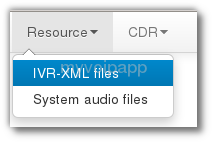
In local-MSS, we can save IVR-XML file into local directory. In cloud-mss, something is different. For safety protection, we require customers to send IVR-XML files to our support team (support(a)myvoipapp.com), our guys will upload your own IVR-XML file to your virtual server. Then, once you sign into cloud-mss, please click menu ‘Resource / IVR-XML files’ to take a look.

check IVR-XML files in cloud-mss
Cloud-MSS menu ‘IVR-XML files’

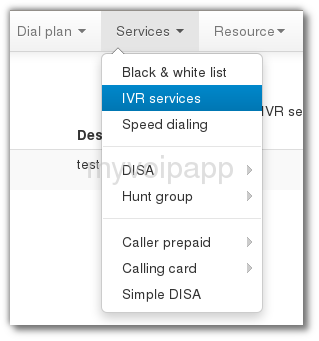
If your own IVR-XML file has been uploaded into your virtual server, you can configure how to trigger IVR service. In MSS, we can trigger IVR services according to called numbers of calls. It is very easy to configure that, please click menu ‘Services / IVR services’ to take a look.

configure detection of IVR-XML service
IVR-XML service trigger

Notice: cloud-mss is migrating

Notice: cloud-mss is migrating

We are migrating cloud-mss servers to a new data centre which can provide more bandwidth and be more stable.

The process will take one or two hours. We have to disconnect all our servers and we are very sorry to stop all customers’ services and thanks for your patient.

We will update this blog if all jobs are finished. Thank you very much.

2013-01-31 UTC 09:18 updated: now, everything is ok!

New versions, same experience!

New versions, same experience!

We are pleasure to announce that local-MSS V11.2 is released and cloud-MSS is upgraded at the same time.

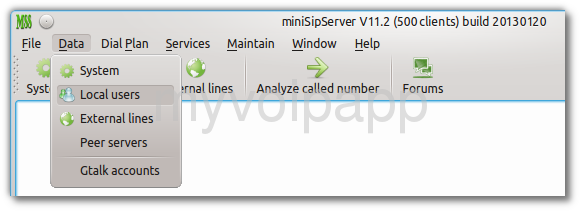
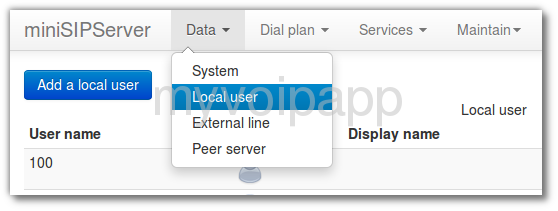
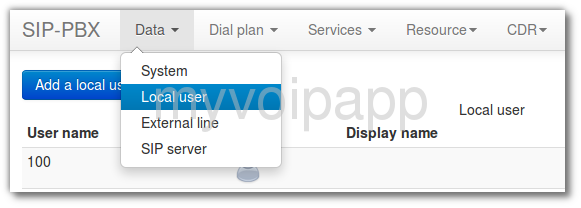
The most important is that all these versions have almost same user experience! As we know, local-MSS has quite different UI with its own web UI and cloud-MSS. Some customers are often  confused when they migrate local-MSS to cloud-MSS since they have quite different UI. From now, they have almost same UI and same operations.  Please take a look at following figures:

GUI of local MSS
GUI of local MSS

web UI of local MSS
web UI of local-MSS

main UI of cloud-MSS

They are almost same, right? Of course, some details are different. We have tried to make them as same as possible to provide unified user experience. Hope you can enjoy it. Take a try please! It is interesting.


miniSipPhone is coming!

miniSipPhone is coming!

At the begining of this year, we upgrade our miniSipPhone to V2 and release it today!

We add some features into MSP V2. For example, some customers are always confused with one-way audio problem. In MSP V2, we configure default STUN process and it can detect NAT automatically. Customers don’t need to configure STUN again.

The new version is as simple as enough, we believe you will find it is so easy to use and hope you can enjoy it!

If you are interesting in it, please visit our website and download it to take a try:

http://www.myvoipapp.com/download/


Gtalk to SIP

Gtalk to SIP

We are very exciting to release miniSipServer new version 11! This is a great version and can support ‘Gtalk to SIP’ feature now.

What that means? It means you can connect your VoIP network with Gtalk network now. Gtalk users can call to your extensions directly, use your VoIP services, and so on. We bring Gtalk into your enterprise communication system. Funny!

Please refer to our online document for more details:

http://www.myvoipapp.com/docs/mss_services/gtalk/index.html