Chrome/Firefox initiates a call to SIP via WebRTC
The newly released miniSIPServer (V70 build 20250402) supports an interesting feature: you can use a WebRTC-compatible browser (such as Chrome, Firefox, etc.) to make calls through miniSIPServer to devices within the SIP domain, including IP phones, gateways and other endpoints. The network topology is shown in the figure below:
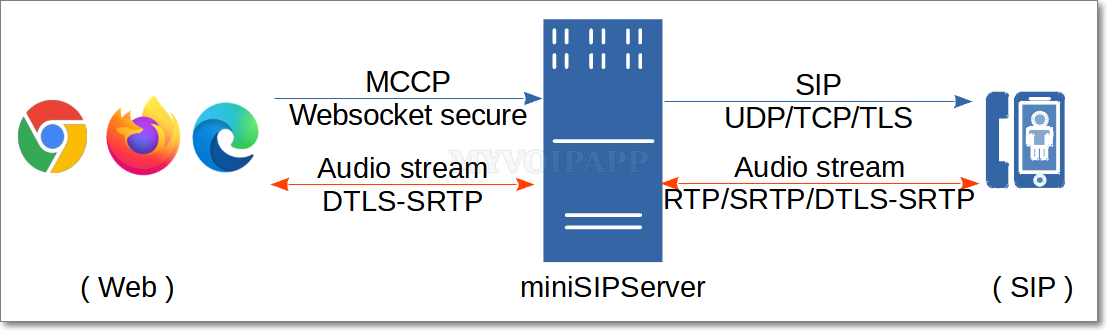
The audio stream is transmitted via DTLS-SRTP with end-to-end encryption and interconnected with miniSIPServer. Currently, only voice calls are supported; video calls are not available.
The web side adopts a simplified signaling protocol (MCCP, miniSIPServer Call Control Protocol) for call control, and interconnects with miniSIPServer via encrypted WebSocket connections (WSS, WebSocket Secure). Currently, only calls initiated from the Web domain to the SIP domain are supported; reverse calls from the SIP domain to the Web domain are not available.
Simply enter the following URL in the browser to initiate a call to the SIP domain (for example, extension 100 calling extension 101):
https://www.myvoipapp.com/miniwebphone2/lite.html?server=192.168.3.70&clr=100&pwd=100&cld=101
The URL adopts a command-line-like format, with each parameter explained as follows:
https://www.myvoipapp.com/miniwebphone2/lite.htmlis a simple webpage. After being loaded in a browser, it can establish a WSS connection with the specified miniSIPServer server and initiate calls. You may download this webpage along with its related resources to your local device or a local web server; calls can also be initiated normally by opening the local file in a browser.
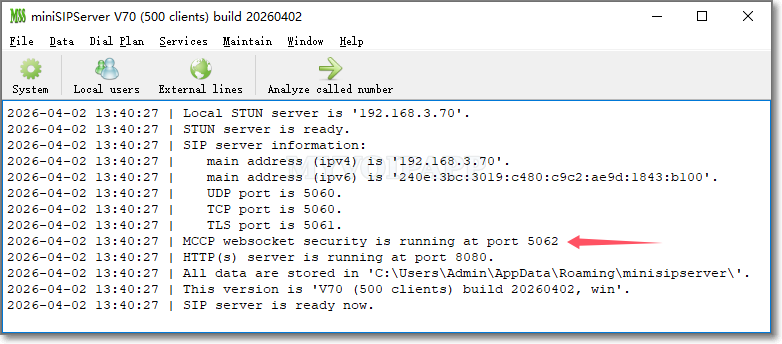
serverspecifies the address of the miniSIPServer. The miniSIPServer must have successfully loaded the certificate and private key, and enabled the WSS service. By default, miniSIPServer always runs the WSS service on TCP port 5062.
clrspecifies the caller number for initiating a call. This number must be a valid extension number assigned on miniSIPServer.
pwdstands for the authentication password of the caller, which is the password configured for the corresponding extension in miniSIPServer. miniSIPServer authenticates calls by verifying the combination of caller number and password. Only authenticated calls are allowed to connect; otherwise, the call will be rejected directly by miniSIPServer.
cldindicates the called number, which can be a local extension number or an outbound dialing number.
The audio stream is transmitted over DTLS-SRTP with end-to-end negotiation and encryption, requiring no additional configuration on miniSIPServer.
To enable the WSS service and accept MCCP call messages from browsers, miniSIPServer only requires configuration of certificate and private key.
miniSIPServer has the following requirements: (1) Certificates and private keys must be stored in the wrtcCert subdirectory under the application data directory; (2) Files must be in PEM format; (3) The certificate must be named server.crt and the private key must be named server.key. For example, on Linux systems, these two files should be located as follows:
$HOME/.minisipserver/wrtcCert/server.crt
$HOME/.minisipserver/wrtcCert/server.key
If the certificate and private key are loaded successfully, miniSIPServer will start the WSS service and prompt the following message:
If using a self-signed certificate, be sure to allow the self-signed certificate to be loaded in browsers such as Chrome and Firefox.