Browsed by
Tag: DNS

miniDNServer

miniDNServer

We have recently released a small piece of software: miniDNServer (abbreviated as MDNS), which mainly addresses two needs related to domain name resolution:

(1) We want to provide domain name access for various computing devices on the internal network, thereby enhancing the flexibility of network deployment. For example, a company’s internal NAS server can be set up to be accessed via the domain name “nas.local“. MDNS provides DNS services for various devices on the internal network through “DNS over UDP (DoU)”.

(2) Considering the hostile nature of the public network environment, we want to be able to access public DNS servers using encrypted methods when accessing external domains, avoiding various interferences with DNS results. In other words, MDNS can forward DNS requests from internal devices for external domains and use “DNS over TLS (DoT)” to access public DoT servers for domain name resolution.

The following diagram describes the network topology of MDNS’s working mode:
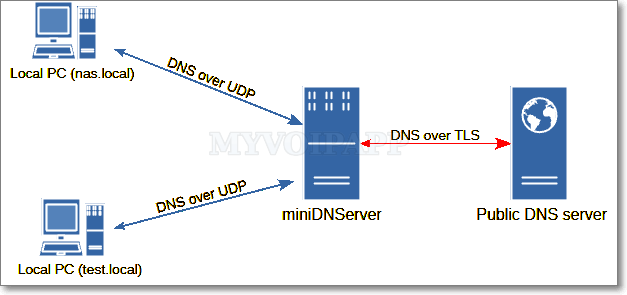
miniiDNServer network topology

MDNS has been used in our own environment for some time, with good results, and we are very satisfied with it. When you are deploying a network environment for small to medium-sized enterprises, you may also consider trying this easy-to-use DNS software.

Checking DNS results

Checking DNS results

One of miniSIPServer cloud customers reported a bug that all his phones cannot register to the cloud system. We checked our networks and cloud nodes and found nothing.

We tried to capture SIP messages from his side but still got nothing. That means all SIP messages from his phones were lost, but his local network was OK, only SIP system was broken.

It is very strange. The customer finally found his local DNS was changed for unknown reasons. His local ISP returned wrong DNS records of our cloud system to his network. After changing the DNS server to Google DNS server, the problem was fixed and his VoIP network came back.

If all your SIP phones are offline and your network is confirmed to be ready, you can try to check DNS records. We suggest following tips to check the DNS records between Google DNS and your local ISP.

If you are working on windows system, you can use nslookup command to check DNS results. For example, we want to check the DNS result of virtual SIP server ‘1425.s1.minisipserver.com’ from Google DNS server which is ‘8.8.8.8’, we can use the command below.

nslookup 1425.s1.minisipserver.com 8.8.8.8

If you are working on Linux system, you can use dig command to check DNS result like following.

dig @8.8.8.8 1425.s1.minisipserver.com 

You can check the DNS results from your local ISP’s DNS server. If its result is different with Google DNS result, that means your local ISP blocks our VoIP cloud system or its DNS results are contaminated for unknown reasons.

Personally, I suggest to use Google DNS server which is ‘8.8.8.8’ or cloudflare DNS server which is ‘1.1.1.1’.

By the way, Debian systems don’t have dig command by default. You need to install the dnsutils package to get such tool.

sudo apt install dnsutils
DNS problem

DNS problem

Yesterday our data center has a DNS problem. In fact, it seems its DNS system was crashed. It made our servers failed to register all external lines. Then cloud system detected that all external lines were configured with wrong configurations. To avoid sending spam messages to peer sides or peer voip providers, our system will cut all “wrong” configurations automatically.

That’s too BAD news!

We promise this problem will not happen again. All our servers have been upgraded to enable several DNS systems including Google DNS.

We are very sorry for this problem. If your external lines are off, please configure them back manually.

Thank you for your patience and continued support.