Browsed by
Author: Gilson

Why I cannot receive voice mail?

Why I cannot receive voice mail?

When some customers use miniSipServer cloud ( for local minisipserver, the same) to process their voice mail, but they are often confused why cannot receive voice mail in their email box.

In fact, we have an online document to describe how to use voice mail feature. Please refer to:

http://www.myvoipapp.com/docs/mss_services/voice_mail/index.html

For MSS cloud, there is a little difference. First, MSS cloud doesn’t support MWI (message waiting indication), so it can only send voice messages to your email address. Sometimes, customers often forget to configure SMTP server information which is necessary for MSS cloud to send your voice mail, or they often forget to cofigure email address of specific extensions.

So let’s describe more details about these. Before this, I assume that you have signin into your MSS cloud account. If not, please sign-up one.

Step 1: configure SMTP server information
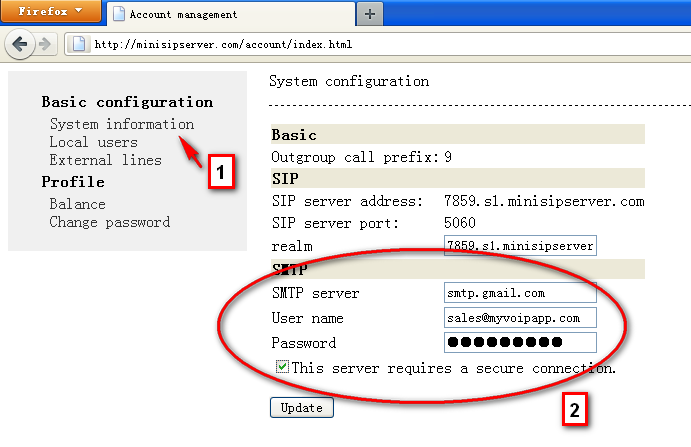
smtp configuration in mss cloud system

Please look at the figure. You need click “system information” linker, then fill your SMTP information there. By the way, for Gmail accounts, they are always required to configure secure connection.

If SMTP information are all right, MSS will use it to send voice mail.

Step 2: configure email address of extension
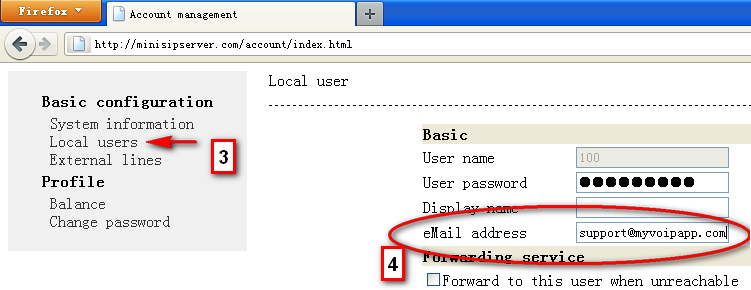
configure email address of extension

Please click “local users” linker and select or add one extension to edit. For voice mail feature, you must configure “eMail address” to make MSS cloud know where the voice mail should be sent to.

Of course, you also need configure “voice mail” service right to this local user / extension.

So after that, for no-answer incoming calls, MSS will prompt the caller party to leave messages and save/mail them to the user’s email address.

miniSipServer cloud released

miniSipServer cloud released

We are very glad to announce that miniSipServer cloud is released today.

“miniSipServer cloud” is one kind of host-pbx service for small business and customers can add more or reduce communication capabilities according to their real requirements. It is very flexible.

Customers will not need to setup local sip server or pbx. It is in cloud and it is FREE to try as many times as you want.

“miniSipServer cloud” is built with miniSipServer and Amazon EC2.  It is the beginning of our cloud-communication. It is so great and we decide to assign “minisipserver.com” to it. so you can begin to try the latest cloud-pbx at following linker:

http://minisipserver.com

V3 upgraded to V3.1.5

V3 upgraded to V3.1.5

By default, there isn’t administrator password in MSS. So if the customers enable HTTP server, it could be very dangerous without password protection.

In this new upgration, the HTTP server will not be startted if there isn’t administrator password in system configuration.

This modification is also merged to latest V4 version.

LTS, stable, development versions upgrated

LTS, stable, development versions upgrated

LTS version is upgraded to V2.10.7 to discard 3PCC process in pickup service because some old voip gateways or phones cannot accept 3PCC process.

V3 is upgraded to V3.1.4, and V4 versions are upgraded together to include above modification. In additional, they are also updated to fix some bugs in web management system.

what will next version be?

what will next version be?

We are working on pushing miniSipServer to be a cloud-pbx system.

What’s that mean? It means it is unnecessary for our customers to maintain a PC or server to run miniSipServer. We can use a miniSipServer in cloud as our own ‘virtual’ PBX, and it will be very easy and flexible to add or reduce communication capabilities. For example, the current miniSipServer is separated to 20/50/100/300/1000 clients version, but for some small business customers, maybe they need 5 local users and hope to add more with the growing of their business. It will be available in cloud-pbx system.

Most features will be same with current miniSipServer running on PC/Server, except that it is running in cloud. It will be same for customers to maintain the cloud pbx through web management system.

45meeting lauched

45meeting lauched

45meeting website is lauched today!

This is a website to provide simple online conference service for small business. It is very easy to use and interesting. And we hope it can benefit our customers.

Please enjoy it. The website is http://45meeting.com.

how to link fxo gateway?

how to link fxo gateway?

It is a often asked question. In MSS, you can use “external line” to connect to your fxo gateway. In our forum, we give a simple description about how to link to linksys 3102. Maybe you can refer to this document for help.

http://www.myvoipapp.com/forums/viewtopic.php?f=5&t=419

(Sorry, since our forums have been removed, above document cannot be visited. Please refer to online F.A.Q document. Thanks. )

miniSipServer LTS upgrade to V2.10.6

miniSipServer LTS upgrade to V2.10.6

MSS LTS is upgraded to fix following problem or provide new feature:

(1) Fix a bug in GSM audo codec.

(2) Limit the max simultaneous call of FXO external line to only 1 by default since most FXO gateway can only support 1 call for one line.

miniSipServer V4.0 is updated

miniSipServer V4.0 is updated

This new version is updated to optimize audio quality of conference call.

In another way, we limit the conference call to only permit at most 3 parties and MSS can help to relay the audio stream for these conference participants even they are deployed behind NAT with STUN supporting.

Stable versions are upgraded to V3.1.2

Stable versions are upgraded to V3.1.2

In this new version, following features are updated:

1. For FXO external lines, the max simultaneous call is limited to 1 by default.

2. The install package is updated to remove previous installed version automatically when installing the new version in the same directory.