Browsed by
Tag: sip over tls

Use Let’s Encrypt certs to enable SIP-over-TLS

Use Let’s Encrypt certs to enable SIP-over-TLS

Let’s Encrypt certificates use the PEM format by default, so they can definitely be used to enable SIP-over-TLS.

We only need to link the Let’s Encrypt certificate file as ‘server.crt’ and the Let’s Encrypt key file as ‘server.key’. For example, the certificate and key signed by Let’s Encrypt for ‘demo.com’ are the following files:

/etc/letsencrypt/live/demo.com/fullchain.pem
/etc/letsencrypt/live/demo.com/privkey.pem

We create the following symbolic links:

ln -sf /etc/letsencrypt/live/demo.com/fullchain.pem $HOME/.minisipserver/siptlsCert/server.crt
ln -sf /etc/letsencrypt/live/demo.com/privkey.pem $HOME/.minisipserver/siptlsCert/server.key

After restarting miniSIPServer, SIP-over-TLS will be started using Let’s Encrypt’s certificate and key.
Optimize “SIP over TLS”

Optimize “SIP over TLS”

In previous versions of miniSIPServer, in order to enable “SIP over TLS”, it was necessary to configure certificate and key files (including self-signed certificates and keys). If these files were not present in the configuration directory, miniSIPServer would not enable SIP over TLS by default.

Most customers deploy “SIP over TLS” using self-signed certificates and keys. Linux systems come with the openssl tool built-in, making it very easy and convenient to create these files. However, Windows systems do not have the openssl tool by default, requiring customers to download the tool to create certificates and keys, which is slightly more troublesome.

To reduce the workload for our customers, we have streamlined the steps for enabling “SIP over TLS” in miniSIPServer:

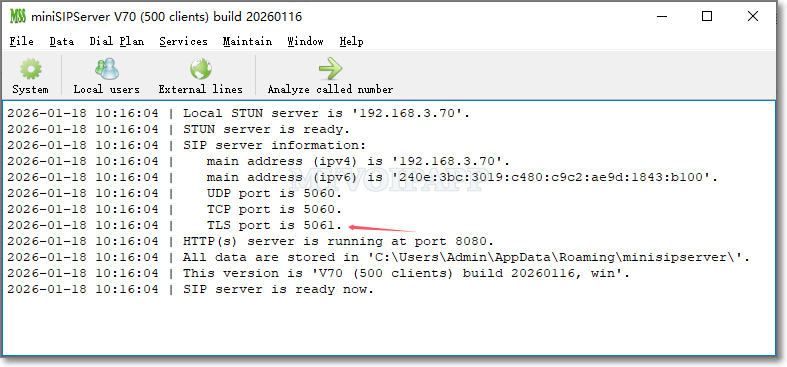
miniSIPServer now enables “SIP over TLS” by default. If certificate and key files are configured, it uses the customer’s provided certificates and keys to encrypt SIP messages. If no certificate or key files are configured, miniSIPServer automatically creates a self-signed certificate and key to encrypt SIP.

Therefore, when miniSIPServer starts, we can see the TLS port information, indicating that “SIP over TLS” has been enabled.