Why I cannot receive voice mail?
When some customers use miniSipServer cloud ( for local minisipserver, the same) to process their voice mail, but they are often confused why cannot receive voice mail in their email box.
In fact, we have an online document to describe how to use voice mail feature. Please refer to:
http://www.myvoipapp.com/docs/mss_services/voice_mail/index.html
For MSS cloud, there is a little difference. First, MSS cloud doesn’t support MWI (message waiting indication), so it can only send voice messages to your email address. Sometimes, customers often forget to configure SMTP server information which is necessary for MSS cloud to send your voice mail, or they often forget to cofigure email address of specific extensions.
So let’s describe more details about these. Before this, I assume that you have signin into your MSS cloud account. If not, please sign-up one.
Step 1: configure SMTP server information
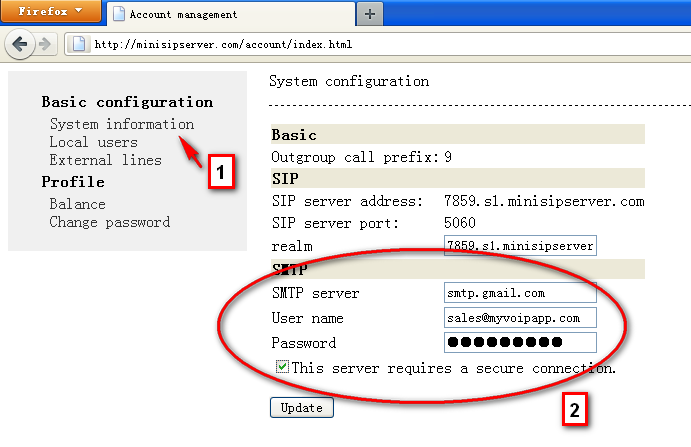
Please look at the figure. You need click “system information” linker, then fill your SMTP information there. By the way, for Gmail accounts, they are always required to configure secure connection.
If SMTP information are all right, MSS will use it to send voice mail.
Step 2: configure email address of extension
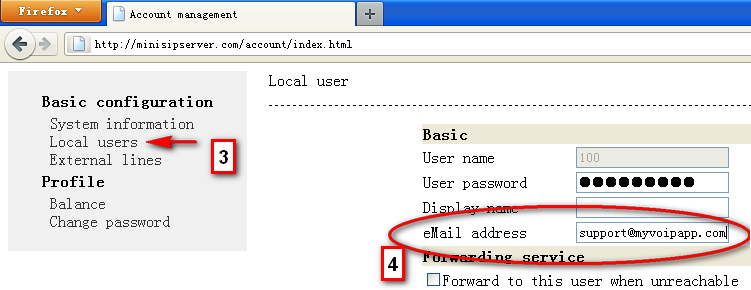
Please click “local users” linker and select or add one extension to edit. For voice mail feature, you must configure “eMail address” to make MSS cloud know where the voice mail should be sent to.
Of course, you also need configure “voice mail” service right to this local user / extension.
So after that, for no-answer incoming calls, MSS will prompt the caller party to leave messages and save/mail them to the user’s email address.