1. Introduction
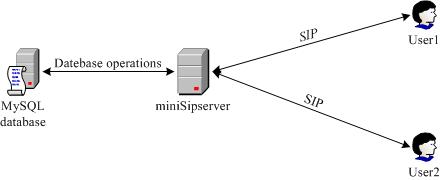
"Calling card" is a virtual card service. It is more like a prepaid account which users can use it to make outgoing call in any SIP clients who have been connected to MSS. With "calling card", the balance is controled. Each calling card has some balance. If the balance is not enough, the user cannot use it to make outgoing call. When one call is finished, some fee will be decreased from the balance.
In another way, MSS can limit some SIP clients to make outgoing call; the feature is "call level". User can use "calling card" to suppress the call level and make outgoing call.
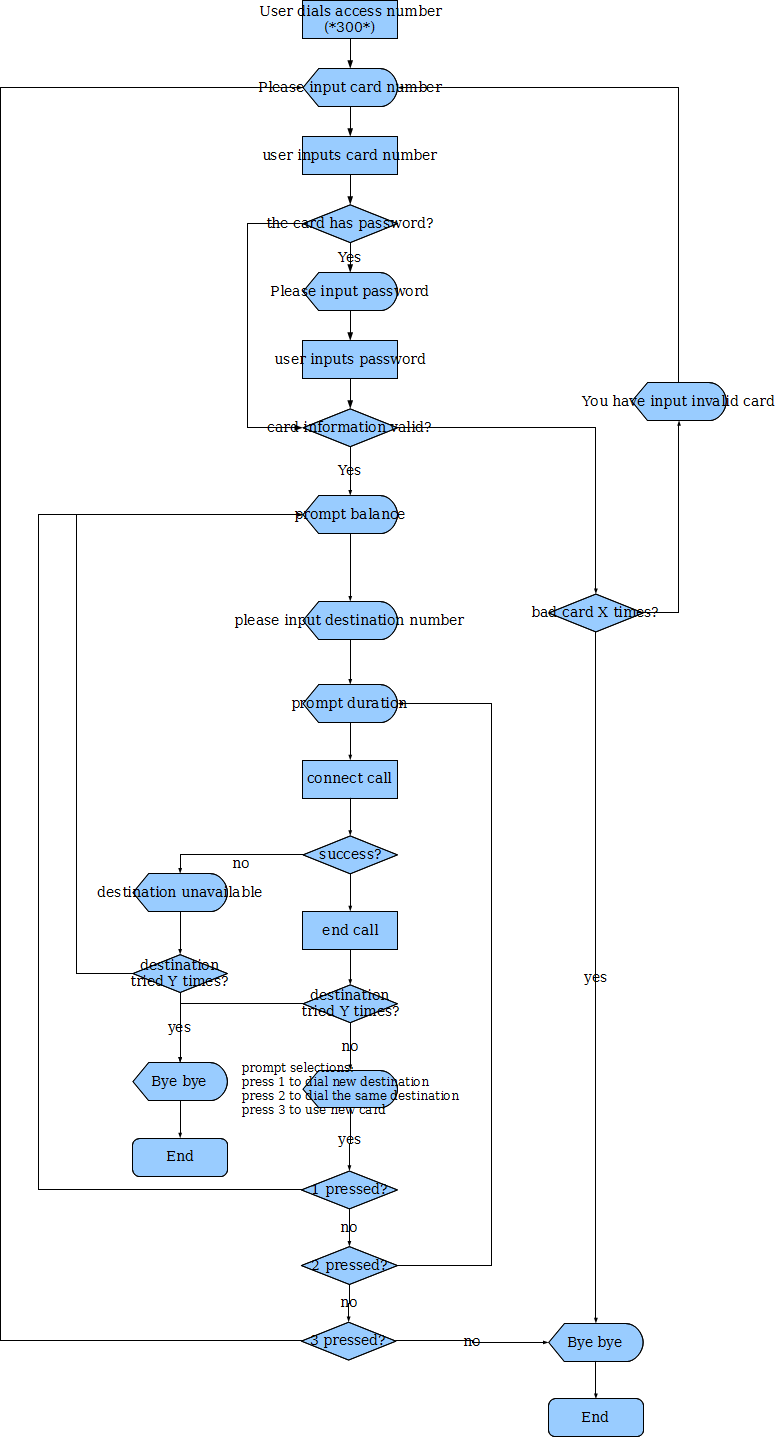
In miniSipServer (MSS), the default called number prefix for "calling card" is "*300*". That means the calling card service will be triggered if the user dials "300*". Below figure describes the basic process of this service.
MSS version 3.1 or above can support this service (previous version can only support simple calling card feature). Please download it from https://www.myvoipapp.com.
We need configure MSS to support this service. These configurations include:
- Connect to database. MSS uses MySQL as its default database.
- Limit some called numbers can only be routed successfully through calling card.
- Configure charge information, such as fee matrix.
- Configure card information, such as card number, password and balance, etc.
2. Basic Configuration
2.1 Remote database
In current phase, MSS can only support MySQL database (please download MySQL from http://www.mysql.com/ and install it firstly).
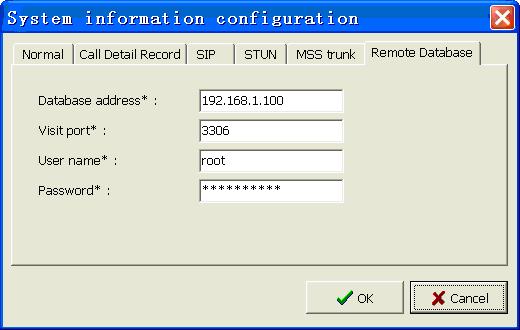
Please click menu "Data->System information->Remote database" and configure the parameters according to your MySQL configurations.
| Item | Value | Description |
|---|---|---|
|
Database address |
domain name or IP address |
Remote MySQL address. Note, MSS and MySQL can be installed in the same computer. In this case, the "database address" should be "localhost". |
|
Visit port |
Integer |
Remote MySQL visit port. If you updated port in MySQL configuration, you need update this configuration in MSS too. The default value is 3306. Please refer to MySQL manual document. |
|
User name |
String |
The user name which is created in MySQL database. The user should have the right to create database, create tables, etc. |
|
Password |
String |
Password of the visit user. It depends on MySQL configuration. |
2.2 Limit called number
In default, all called numbers in MSS can be routed for all local users. If we want to deploy calling card service, of course, some called numbers or all called numbers must be limited. For example, we can limit users that they cannot make out-group call but they can do it through calling card.
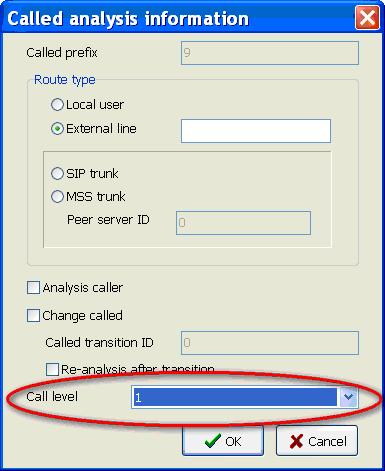
What we should do is set "call level" for such called number. Please click menu "Dial plan->Called analysis" and select or add called prefix to edit. For example, we limit the call level for "external line" call to 1. That means the call will success if the user has "call level 1" right or through "calling card" service.
2.3 Charge information
Since "Calling card" is a prepaid service, it is important to configure prepaid information. It includes following configuration: (1) Configure prepaid rate; (2) Configure fee matrix.
2.3.1 Prepaid rate
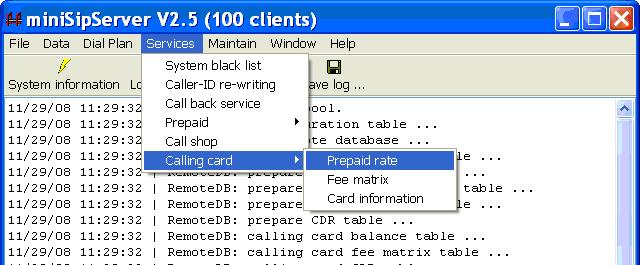
Please click menu "Services->Calling card->Prepaid rate" and prepare to add a new prepaid rate.
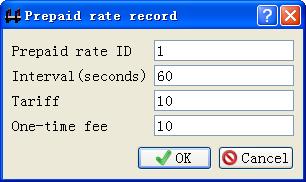
| Item | Value | Description |
|---|---|---|
|
ID |
Integer |
Indication of current record. |
|
Interval |
Integer |
Interval for calculating fee. The unit is "second". |
|
Tariff |
Integer |
Fee for each "Interval". |
|
One-time fee |
Integer |
Once the call is answered, this fee will be reduced from the balance just one time. It can be zero and optional by default. |
For an example, "ID=1; Interval=60; Tariff=10; One-time fee=20". It means that MSS should reduce 20(cents,etc) immediately when the call is answered and reduce 10(cents,etc) from the card's balance every 60 seconds.
2.3.2 Fee matrix
Please click menu "Services->Calling card->Fee matrix" and prepare to configure how to calculate fee.
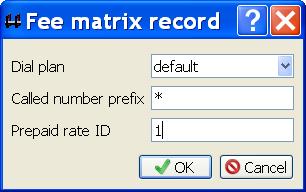
"Dial plan" plus "called number prefix" to be a unified index to identify a record.
| Item | Value | Description |
|---|---|---|
|
Dial plan |
String |
The dial plan gotten from basic call. By default, it is used to do "analysis called number" to get final routing. |
|
Called number prefix |
String |
The destination prefix which the call will be routed. This field can be set with "*". That means for all destinations. Different dial plan with the same called number prefix can be assigened with different charge traffic. |
|
Prepaid rate ID |
Integer |
Prepaid rate for calculating fee. This ID is configured in previous section "2.3.1Prepaid rate". |
For examples:
We configure following records in the "fee matrix" table.
| Dial plan | Called number prefix | Prepaid rate ID | Description |
|---|---|---|---|
|
vip |
10 |
1 |
|
|
vip |
1 |
2 |
|
|
vip |
* |
3 |
|
|
default |
10 |
4 |
Any subscribers call destination with prefix "10", the rate "4" will be applied. |
|
default |
1 |
5 |
Any subscribers call destination with prefix "1", the rate "5" will be applied. |
|
default |
* |
6 |
For all prepaid subscriber and all destination, the rate "6" will be applied. |
|
common |
4 |
7 |
Then, we can see which rate will be applied in following cases.
- The local user "100" whose dial plan is "vip" makes a call to "101", the rate ID "1" will be applied.
- The local user "100" whose dial plan is "vip" makes a call to "110", the rate ID "2" will be applied.
- The local user "100" whose dial plan is "vip" makes a call to "200", the rate ID "3" will be applied.
- The local user "200" whose dial plan is "common" makes a call to "101", the rate ID "4" will be applied.
- The local user "200" whose dial plan is "common" makes a call to "110", the rate ID "5" will be applied.
- The local user "200" whose dial plan is "common" makes a call to "200", the rate ID "6" will be applied.
- The local user "200" whose dial plan is "common" makes a call to "400", the rate ID "7" will be applied.
2.4 Card information
A card always includes following information: card number, password for this card and balance.
Please click menu "Services->Calling card->Card information" to add or edit a card information.
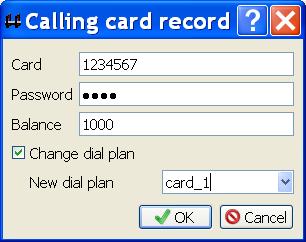
| Item | Value | Description |
|---|---|---|
|
Card |
String |
Card number. |
|
Password |
String |
Password for this card. This item can be blank. If it is blank, the service logic will not prompt users to input password. |
|
Balance |
Integer |
Balance. |
|
Change dial plan |
yes or no |
It is used to indicate whether it is necessary to change dial plan. Once the dial plan is changed, MSS will use the new dial plan to search the fee matrix. In another way, MSS will use the new dial plan to do "analysis called number" for routing. |
|
New dial plan |
string |
New dial plan to replace previous dial plan gotten from basic call. Once it is changed, the final routing may be effected together. |
3. Advance configuration
3.1 Announcement files
As described in chapter "Introduction", several audio will be played to caller party. These audio files are recorded in English default. All audio files are installed in directory "mss_install_directory\ann". You can replace them as you want.
Please refer to document "record our own audio" for details.
3.2 CDR
A table will be created in MySQL database to store all CDRs of these calling cards. The table name is 'tbl_callingcard_cdr'. The advance user can visit or query it directly.