How to record our own audio?

MyVoipApp Support Team

Support@myvoipapp.com

All audio files have been installed with MSS (miniSipServer) and stored in the directory "$mss_install_dir\mss_ann". For example, if MSS is installed in directory "d:\mss", the audio files will be installed in directory "d:\mss\mss_ann".

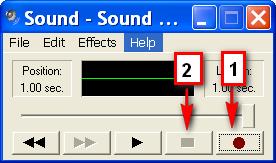
There is a very easy way to record our own announcement. In windows system, there is a tool "sound recorder" can do that. Please click "start->Run ..." and enter "sndrec32.exe" to run it. For windows Vista/Windows 7, the default 'sound recorder' application is changed and we cannot use it to record WAV files. Please click here to get 'sndrec32.exe'.

sound recorder

Press button 1 to begin record your announcement and press button 2 to stop recording. Then, please click menu "File->Save as ..." to save your announcement. In the "Save as ..." window, please click "Change ..." button to change WAV format.
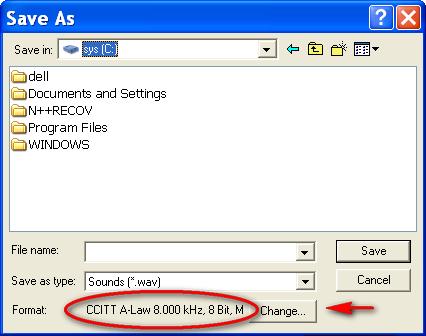
save as

In the popup "Sound selection" window, please select "CCITT A-Law" format, and select "8KHZ, 8Bit, 7kb/sec" attributes.
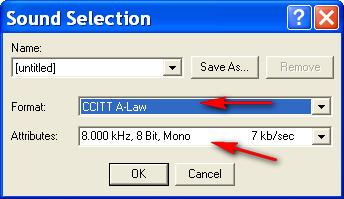
sound selection

Then, we can save our own announcement or record to replace above WAV files. After that, we must restart MSS to re-load this announcement.

By the way, if we have some others announcement but not such audio format, we can also use "sound recorder" tool to convert it to above format and attributes.

Below table lists all audio files and their contents. In your deployment, you can replace them with your own audio files.

In MSS, audio file name must be "xxx.wav" format. "xxx" must be 8 characters and only 0-9 and a-f are valid. In fact, "xxx" is the audio ID in MSS exactly.

Audio ID (audio file) Service Content

00080002

Common

Music

00080003

ringing-back tone

00080030

zero

00080031

one

00080032

two

00080033

three

00080034

four

00080035

five

00080036

six

00080037

seven

00080038

eight

00080039

nine

0008003a

ten

0008003b

eleven

0008003c

twelve

0008003d

thirteen

0008003e

fourteen

0008003f

fifteen

00080040

sixteen

00080041

seventten

00080042

eighteen

00080043

nineteen

00080044

twenty

00080045

thirty

00080046

forty

00080047

fifty

00080048

sixty

00080049

seventy

0008004a

eighty

0008004b

ninety

0008004c

hundry

0008004d

thousand

0008004e

million

0008004f

billion

00080050

second

00080051

minute

00080052

euro

00080053

cent

00080054

and

01080000

A beep tone

01080001

Your operation is success.

02080003

Voice mail

Press 0 to delete current message. Press 1 or wait for several seconds to go to next message.

02080004

Please leave your message

02080005

You have no message.

07080001

Caller prepaid

Sorry, your balance is insufficient. Please make a payment.

08080001

Hunting group

All operators are busy now, please wait a moment. Your waiting number is

0a080001

Auto attendant

Welcome, please input extension number

84080001

Calling card

Please input your calling card number

84080002

Please input password

84080003

Please enter your destination number, followed by the pound key.

84080004

Your duration is

84080005

Your balance is

84080006

Destination unavailable.

84080007

Invalid card.

84080008

Bye bye.

84080009

Please press 1 to dial new destination, press 2 to dial the same destination, or press 3 to use a new card.

85080001

DISA

Please input your DISA account

85080002

Please input password

85080003

Please input destination number