In some scenarios or deployment, we need to control the duraion of some call process. If the call process reachs the max duration, we hope the server can release the call automatically.
In miniSIPServer, we name it as "long duration control" service. miniSIPServer can support sevral kinds of control methords:
- Set long duration control for specific local users.
- Set long duration control for specific external lines.
- Set long duration control for specific destinations.
It is very easy to configure "long duration control" in miniSIPServer.
2.1 Local user configuration
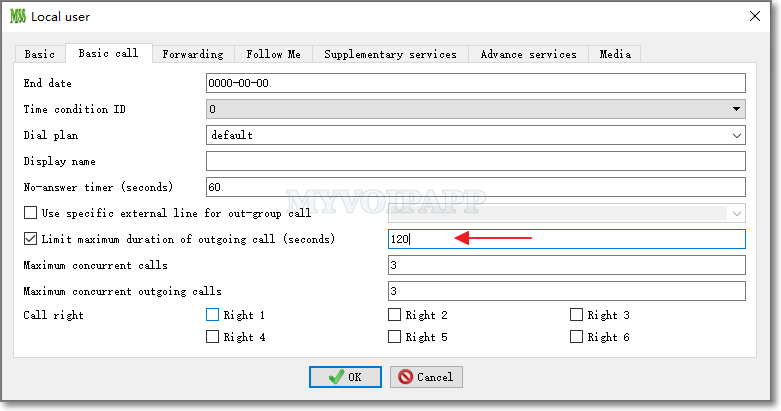
In the local user configuration dialog, please click "basic call" tab and select "limit maximum duration of outgoing call" which is followed with a duration value.
2.2 External line configuration
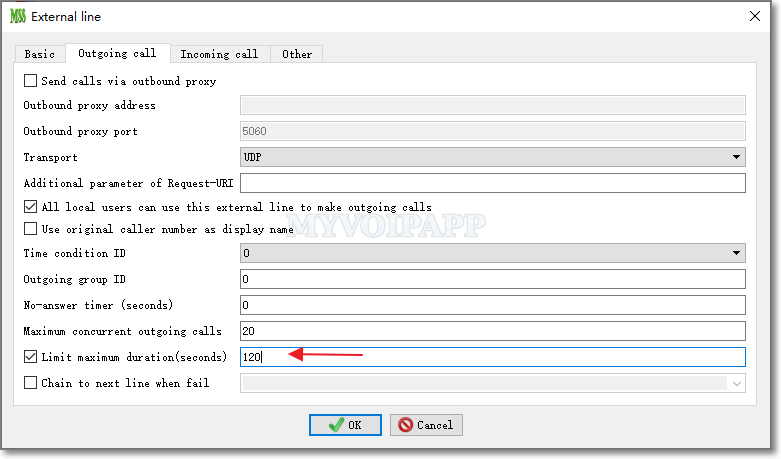
In the external line configuration dialog, please click "outgoing call" tab, then please select "limit maximum duration" and fill the duration value.
2.3 Dial plan configuration
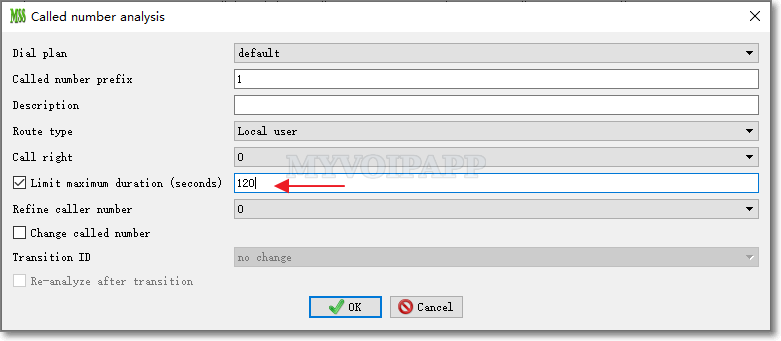
In dial plan configuration, we can also limit "max duration" for specific destinations,for example, we can limit the duration of the call routed to the destination whose prefix is "1", such as 100, 101,102,etc.
Please click menu "dial plan / analyze called number". In the dialog, please select "limit maximum duration" and fill the duration value.