Caller-ID re-writing
MyVoipApp Support Team
Support@myvoipapp.com
1. Introduction
In normal, when an incoming call is received, the called party or called user can only see the caller number. The called party cannot know who is calling unless the called user remembers these incoming call's numbers. It is very hard.
The better way is that the SIP phone displays who is coming. For example, if the call is coming and the caller number is '101', the phone displays that 'Gilson' is the caller.
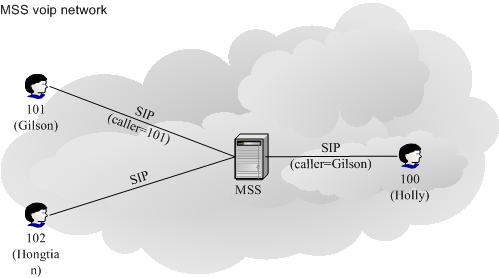
MSS (miniSipServer) provides "Caller ID rewriting" service to fit this requirement. In MSS, the local user who has "caller ID rewriting" service right can update the caller name when he/she receives an incoming call.
When MSS begin to update caller ID information, it will check system configurations firstly. If MSS has configured some caller ID rewriting information, MSS will return it. If there aren't system configurations or there isn't a record which can match the current call's caller id, then MSS will invoke a Python script. For advanced user, you can update this Python script to customize your own service logic. The basic service flow is described as following figure.

Following section describes how to configure this demo network.
2. Configuration
It is very easy to deploy "Caller ID rewriting" feature. Following informations will be configured to provide "Caller ID rewriting" service.
- Called user service right configuration.
- System configuration for this service
- Python script;
2.1 service right
Click menu "Data / Local users / Advance services" to show local users information window. In this window, click 'Add' button to add a new local user or double click an existed user to update his/her informations as following figure.

In this dialog, select "Caller ID with name" to make current user has this service right.
2.2 System configuration
Click menu "Service / Caller ID with name" to show service information window.

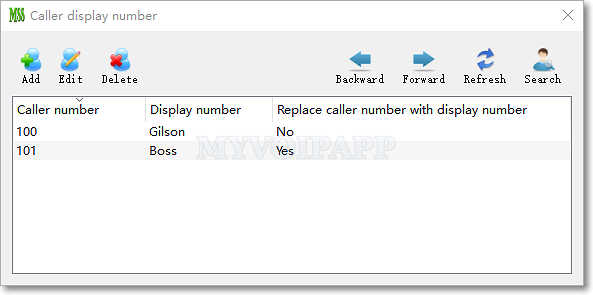
In this window, click button "Add" to add a user like following.

It means that caller number '120100' will be changed to display 'Holly' to called party. Then, the caller user will see that 'Holly' is calling.
2.3 Python script
In the MSS install directory, there is a Python script file whose name is 'mss_caller_id_rewriting.py'. You can update this script to return caller display name according to your own requirement, such as search in a database, sendmail to special address, etc.
The default script is very simple, it only returns the caller ID as caller display name to MSS.
|
def get_caller_dspname(caller_id): return caller_id |
Note, the function body can be updated as you like, but the script file name and the function name cannot be changed.