We discuss a demo network topology below firstly.
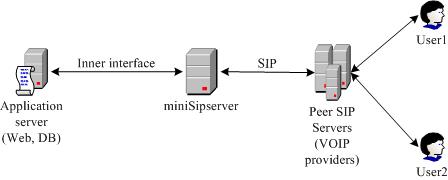
In the callback network, there are three network elements:
Application server (AS): AS is responsible for user interface, billing and data storage. It indicates MSS to establish Callback connections.
miniSIPServer (MSS): MSS is responsible for receiving instructions from AS and initiate, maintain and release VOIP connections. And most important, MSS is responsible for maintaining call-back service.
Peer SIP Server (PSS): provided by VOIP providers. PSS is responsible for connecting traditional telecom network. It could be a VoIP gateway.
1.1 Service description
Callback service is a special service. The service is not initiated from one phone or client as normal but from an AS. AS indicates MSS to establish VOIP connections with two user numbers.
When MSS receives this command, MSS establishs a VOIP connection towards to user1 firstly. When the user answers the call, MSS will try to establish a VOIP connection towards to user2. When user2 answers the call, MSS will merge these two call sessions and establish connections between user1 and user2.
After one of these calls is disconnect, MSS will release whole call-back process and report call details report to AS.
Of course, during this process, AS can send command to MSS to cancel or release callback call.
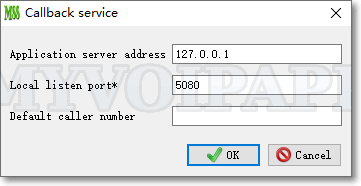
Please click menu 'services / call back service' to configure call-back service.
| Item | Description |
|---|---|
| Application server address | Its default value is '127.0.0.1' and it can be blank. If it is blank, miniSIPServer should be able to receive all call-back messages from any AS. If it is configured with one IP address, miniSIPServer can only receive call-back messages from such IP address. |
| Local listen port* | This is the UDP port which miniSIPServer will open to receive instructions from AS. If it is zero, miniSIPServer will not open UDP port. When this item is updated or modified, we should restart miniSIPServer to enable it. |
| Default caller number | If REQUEST message doesn't include 'caller1' parameter, miniSIPServer will use this number to be the caller number in the first call, and if this default caller number is blank, the caller number of the first call will be set to 'anonymous'. |
Following figure describes a basic flow between AS and MSS.
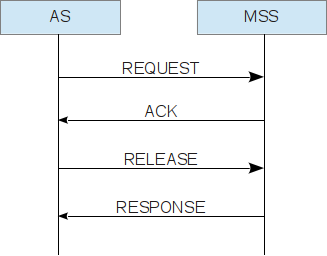
This inner interface(IIF) is based on UDP socket. MSS will open a UDP socket to receive command and response inner status to the application server. By default, MSS uses UDP port 5080 to do it.
IIF is text-encoded message. An IIF message is either a request message from AS to MSS, or a response message from MSS to AS.
IIF message = Method: Parameters.
"Method" should be uppercase and "Parameters" should be lowercase.
3.1 Method
In current version, there are four methods: REQUEST, ACK, RELEASE and RESPONSE.
REQUEST message is used by AS to indicate MSS establish callback service.
ACK is a response message to indicate AS that MSS has parsed the REQUEST message and begin to establish call sections.
RELEASE message is used by AS to cancel current callback call.
RESPONSE is from MSS. It carries the real duration of current call.
3.2 Parameters
Parameters have two parts. One is parameter name and another is parameter value. They are always formatted as following.
Parameter = "parameter name=parameter value".
Parameters are separated with ';'
For an example, here is a demo parameters string. "id=1234;user1=100;user2=101". In this demo, there are three parameters: 'id', 'user1' and 'user2'.
Following sections define details parameters for IIF methods.
3.2.1 Parameters in REQUEST message
| Parameter | type | length | Description |
|---|---|---|---|
| id | string | less than 32 characters | Call section identity assigned by AS |
| user1 | string | less than 32 characters | User 1. The called party in the first call. |
| user2 | string | less than 32 characters | User 2. The called party in the second call. |
| caller1 | string | less than 32 characters | Optional parameter. With this parameter, MSS will set it as caller party number in the first call. |
| caller2 | string | less than 32 characters | Optional parameter. With this parameter, MSS will set it as caller party number in the second call. |
| duration | integer | >=0 | how many seconds current call section can process. |
| ann_id1 | string | 8 digits string | Optional parameter and indicates to play announcement to user 1 when it answers the call. The default "ann1" is 00080003 which is a ring-back tone. You can load your own audio file to MSS and play it to the user 1 with this paramter. |
| ann_id2 | string | 8 digits string |
Optional parameter and indicates to play announcement to user 2 when it answers the call. You can load your own audio file to MSS and play it to the user 2 with this paramter. |
| ann_digit2 | string | >0 | Optional parameter and indicates to play digit announcement to user 2 when it answers the call. |
| record_call | - | - | Optional parameter. If REQUEST message has this parameter, that means MSS should record current call-back call. |
| fob_nbr1 | string | less than 32 characters | Forwarding number 1. MSS will try this number when user2 is busy. |
| fob_nbr2 | string | less than 32 characters | Forwarding number 2. MSS will try this number when 'fob_nbr1' target is busy. |
| fob_nbr3 | string | less than 32 characters | Forwarding number 3. MSS will try this number when 'fob_nbr2' target is busy. |
For example:
REQUEST: id=1234;user1=100;user2=101;duration=3600;
It means AS request a CALLBACK service. The service or the call is identified by AS with call ID '1234'. In this request, the first called party is '100', and the second called party is '101'. After the first called party answers the call, the whole call process can continue about 3600 seconds.
3.2.2 Parameters in ACK message
| Parameter | type | length | Description |
|---|---|---|---|
| id | string | less than 32 characters | Call section identity. It is the same parameter in REQUEST message. |
| sid | integer | >0 | service identity assigned by MSS. |
| code | string | less than 32 characters | It indicates whether the request message is processed. There are only two values.ok or fail |
For example:
- ACK: id=1234;sid=5678;code=ok;
- ACK: id=1234;code=fail;
3.2.3 Parameters in RESPONSE message
| Parameter | type | length | Description |
|---|---|---|---|
| id | string | less than 32 characters | Call section identity. It is the same parameter in REQUEST message. |
| sid | integer | >0 | service identity assigned by MSS. It is the same parameter in ACK message. |
| real_duration | integer | - | It indicates how many seconds current call continues. |
For example:
RESPONSE: id=1234;sid=5678;real_duration=180;
It means both users have talk for about 180 seconds and then the call is released.
3.2.4 Parameters in RELEASE message
| Parameter | type | length | Description |
|---|---|---|---|
| id | string | less than 32 characters | Call section identity. It is the same parameter in REQUEST message. |
| sid | integer | >0 | service identity assigned by MSS. It is the same parameter in ACK message. |
For example:
RELEASE: id=1234;sid=5678;
It means AS requires MSS to release the callback call whose id is '1234' and sid is '5678'.
4.1 Can you provide a demo application to send callback request to MSS?
Well, the key point is to open a UDP socket to send text strings. Please refer to attached 'callback.php.zip'. We write a demo application in PHP. This application only sends a demo command string to our MSS server and doesn't wait response messages. You can update it according to your requirements or rewrite it in other languages.