"Call recording" service is used to record telephone conversations in a digital audio file format. In some area, this service is also named as "lawful interception (LI)". We need mention here that you MUST obey your local law or rules to use this service.
miniSIPServer V6.4 or above version can support this service. By using MSS, we can record local users or external lines' incoming calls, local users' outgoing calls. Each call will be saved into seperated .WAV file. You can use Windows media player or other audio tools to play them very easily.
2.1 Local user configuration
When we want to record specific local users' calls, we can update their configurations to do that. In the local user's dialog, please click "media service" tab just as following figure described:
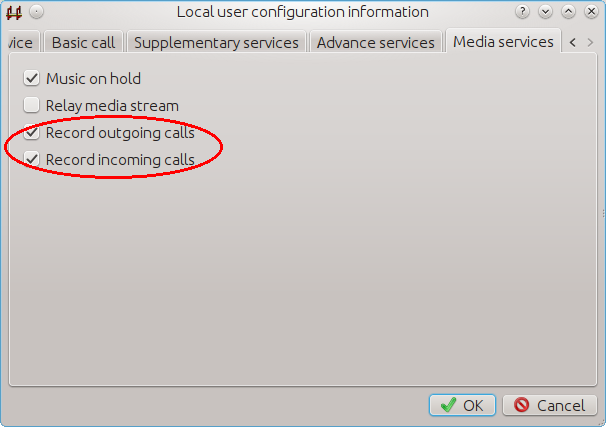
In the figure, we can see two items:
- Record outgoing calls - When this local user makes outgoing calls, they will be recorded and all audio streams will be saved in .WAV files.
- Record incoming calls - When this local user receives incoming calls, they will be recorded and all audio streams will be saved in .WAV files
These items can be enabled together, or enabled separately.
2.2 External line configuration
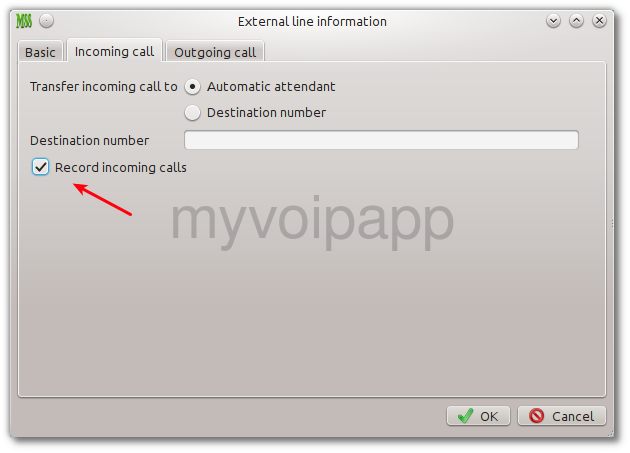
At this time, miniSIPServer only support recording external line incoming calls. In external line's dialog, please click 'Incoming call' tab and enable 'record incoming call' item.
2.3 Common detection
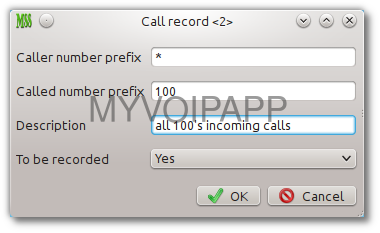
miniSIPServer V13.5 or abover can support common detection. We can indicate MSS to record calls according to their caller numbers and called numbers. Please click menu "services / call record".
| Item | Description |
|---|---|
| Caller number prefix* | Caller number prefix used to match calls. If it is '*', that means for all caller numbers. |
| Called number prefix* | Called number prefix used to match calls. If it is '*', that means for all called numbers. |
| Description | Description of current record. |
| To be recorded | Calls matched current record should be recorded or not. |
In the miniSIPServer AppData directory, you can find a subdirectory 'recordCalls'. All recorded calls will be saved in such directory. Each local user will have its own subdirectory. For example, All calls of local user "100" will be saved in the subdirectory "recordCalls/100".
The WAV file is named with format "caller number-called number-datetime-id.wav". For example, if the name of wav file is "100-101-20120310-112233-6d82001.wav", that means the call is from "100" to "101", date is 2012-03-10 and the time is 11:22:33, and 6d82001 is record-id used in miniSIPServer.
If local user or external line is configured with "call recording", all of their media streams will be sent to MSS firstly, it is heavy for server to process them, so you can not try to record too many targets.
To record calls, all SIP clients/gateways MUST support G711a(PCMA) audio codec or G711u(PCMU) audio codec. MSS cannot support other audio codec when recording calls.
MSS cannot support recording video calls.